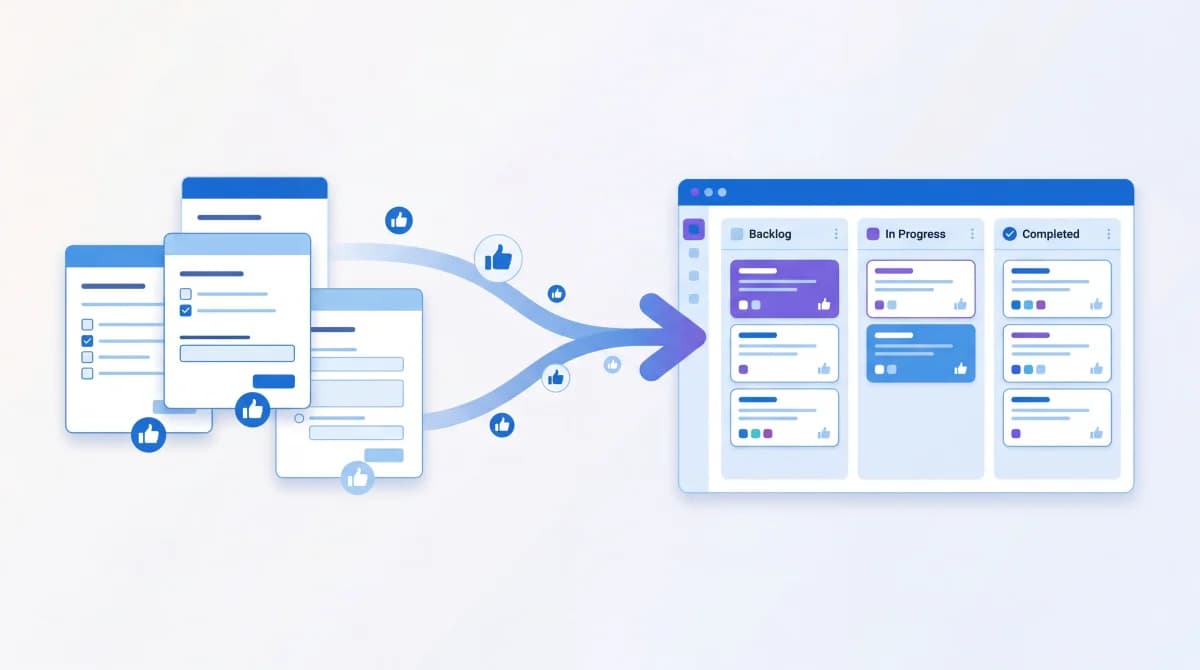
Most product teams run surveys, collect hundreds of responses, dump them into a spreadsheet, and never look at them again. The data sits there while PMs make roadmap decisions based on gut feeling and whoever talked loudest in the last meeting.
The problem isn't the survey itself. It's what happens after. Survey responses only become useful when they connect directly to your roadmap prioritization process.
I've built Feeqd specifically to solve this gap: turning scattered feedback into prioritized roadmap items. Here's what I've learned about how product teams actually make this work.
Why Most Survey Data Never Reaches the Roadmap
Product teams run NPS surveys, CSAT checks, and feature request forms regularly. But according to Gartner's customer experience research, less than 10% of companies systematically act on the feedback they collect.
Three things break the survey-to-roadmap pipeline:
- Data lives in the wrong place. Survey results end up in Google Sheets, Typeform dashboards, or email inboxes. Your roadmap lives in Jira, Linear, or a Notion doc. There's no bridge between them.
- Responses lack prioritization. A survey tells you what people want but not what they want most. Ten users requesting dark mode and ten requesting API access look identical in a spreadsheet.
- Surveys are snapshots, not streams. You run a quarterly survey, get results, and the data is already stale by the time you analyze it. User needs change faster than your survey cadence.
Step 1: Centralize Responses into a Feedback Board
The first thing to do with survey responses is get them out of isolated tools and into a system where your whole team can see, search, and organize them.
A feedback board acts as the central hub. Instead of responses living in a survey tool, each meaningful response becomes a trackable item with a status: Pending, Next, In Progress, or Completed.
In Feeqd, you can set up different boards for different feedback types:
- Feature Requests board for new functionality asks
- Bugs & Fixes board for reported issues
- General Feedback board for open-ended input
This structure means a survey response like "I wish I could export data to CSV" becomes a concrete entry on your Feature Requests board, not a line buried in row 247 of a spreadsheet.
Step 2: Let Users Vote to Surface Priorities
Here's where most teams fail: they try to prioritize survey responses by reading every single one and making judgment calls. That doesn't scale.
Community voting solves this. When feedback items live on a public board, your users can upvote the ones that matter most to them. Instead of guessing which of the 50 feature requests is most important, you let your user base tell you.
This shifts prioritization from "the PM thinks X is important" to "142 users voted for X." That's a fundamentally different conversation in a roadmap planning meeting.
Voting data also reveals patterns that surveys miss. A survey might show that 30% of users want "better integrations." Voting on specific integration requests shows that Slack integration has 3x more votes than Zapier. That level of specificity changes what you build.
Step 3: Connect Feedback Directly to Your Roadmap
Survey responses that sit in a separate system from your roadmap create a gap. You end up with two disconnected views: "what users want" over here and "what we are building" over there.
The fix is linking feedback items directly to roadmap entries. When a feature request with 80 votes gets added to your roadmap, everyone involved (your team and your users) can see the connection.
In Feeqd, you can add voted entries from any feedback board directly to a roadmap. The roadmap then shows items in a Kanban view with four columns: Pending, Next, In Progress, and Completed. Users watching a public roadmap can see their requested feature move through the pipeline.
This closes the loop. The user who submitted the original survey response can see their input turned into a planned feature. That's how you build trust and keep users engaged.
Step 4: Replace One-Off Surveys with Continuous Collection
The biggest shift product teams can make is moving from periodic surveys to continuous feedback collection. Instead of asking "what do you think?" once a quarter, you keep a channel open at all times.
Three ways to do this:
- Embedded widgets: A lightweight feedback widget inside your product lets users submit input the moment they think of it. Feeqd's widget is 18KB, so it loads without affecting your page performance.
- Public feedback boards: Share a board link where anyone can submit and vote on ideas. This turns feedback from a one-way survey into a two-way conversation.
- Shareable links: Send direct links for targeted feedback on specific features or areas of your product.
Continuous collection means your roadmap data is always fresh. You're not making decisions based on a survey from three months ago. You're looking at what users are voting for right now.
Step 5: Use Feedback Categories to Spot Themes
Raw survey responses are noisy. "The app is slow" and "loading takes forever on the dashboard" are the same issue phrased differently. Without categorization, you count them as two separate items instead of one trend.
Organize feedback into categories that map to your product areas:
- Performance issues
- Feature gaps (missing functionality)
- UX friction (confusing workflows)
- Integration requests (connections to other tools)
When you tag and sort feedback entries this way, themes surface naturally. If 40% of your "Feature gaps" entries are about reporting and analytics, that's a strong signal for your next roadmap cycle, stronger than any single survey question could provide.
Common Mistakes to Avoid
Treating all feedback equally. Not every survey response deserves a roadmap slot. A request from a churning enterprise customer carries different weight than a suggestion from a free trial user. Use voting data plus customer segment to prioritize.
Waiting too long to act. If users see their feedback disappear into a void, they stop giving it. Show movement within weeks, not quarters. Even changing a status from "Pending" to "Next" signals that someone's listening.
Ignoring qualitative context. Votes tell you what's important. The original survey response tells you why. When you add a feedback item to the roadmap, keep the original context attached. A feature request with "I need this because I spend 2 hours a week doing it manually" is more actionable than a bare title.
Over-surveying. If you have continuous feedback channels, you need fewer formal surveys. Every survey competes for user attention. Focus surveys on specific questions that passive feedback doesn't answer, like pricing sensitivity or satisfaction with recent changes.
Tools That Help
Building this workflow requires a tool that combines feedback collection, voting, and roadmap planning. Here's what's available:
| Tool | Voting | Public Boards | Roadmap | Free Plan |
|---|---|---|---|---|
| Feeqd | Yes | Yes (custom subdomain) | Yes (Kanban + list) | Yes (3 boards, 60 entries) |
| Canny | Yes | Yes | Yes | No (starts $99/mo) |
| UserVoice | Yes | Limited | Yes | No (enterprise pricing) |
| Productboard | Partial | No | Yes | No (starts $25/mo) |
| Nolt | Yes | Yes | No | No (starts $29/mo) |
The key difference is whether the tool connects all three steps (collect, vote, roadmap) or only handles one. A survey tool collects data. A voting tool prioritizes. A roadmap tool plans. You want all three in one place so nothing falls through the cracks.
FAQ
Can survey responses replace user interviews for roadmap planning?
No. Surveys and voting data are great for identifying what users want and how many want it. But they rarely explain the full context behind a request. As Nielsen Norman Group's research on user feedback shows, open-ended responses need qualitative analysis to uncover the "why." Use survey data to prioritize which topics to explore, then run targeted interviews for the top items before committing roadmap resources.
How many survey responses do you need before making roadmap decisions?
There's no magic number, but look for patterns rather than individual responses. If 5 out of 20 respondents mention the same issue, that's a 25% signal worth investigating. With voting boards, you can get signal faster because users self-select the highest-priority items.
Should survey feedback be public or private?
Both. Keep raw survey responses private since they often contain sensitive details. But translate the synthesized feedback into public board items where your community can vote. This gives you the best of both worlds: honest private input and public prioritization.
How often should product teams review survey data for roadmap updates?
With continuous feedback and voting, you don't need a formal review cycle. Instead, check your top-voted items weekly and factor them into sprint planning. For major roadmap shifts, review trends monthly. The goal is to make feedback part of your regular workflow, not a quarterly event.
Get started with Feeqd for free
Let your users tell you exactly what to build next
Collect feedback, let users vote, and ship what actually matters. All in one simple tool that takes minutes to set up.
Sign up for free