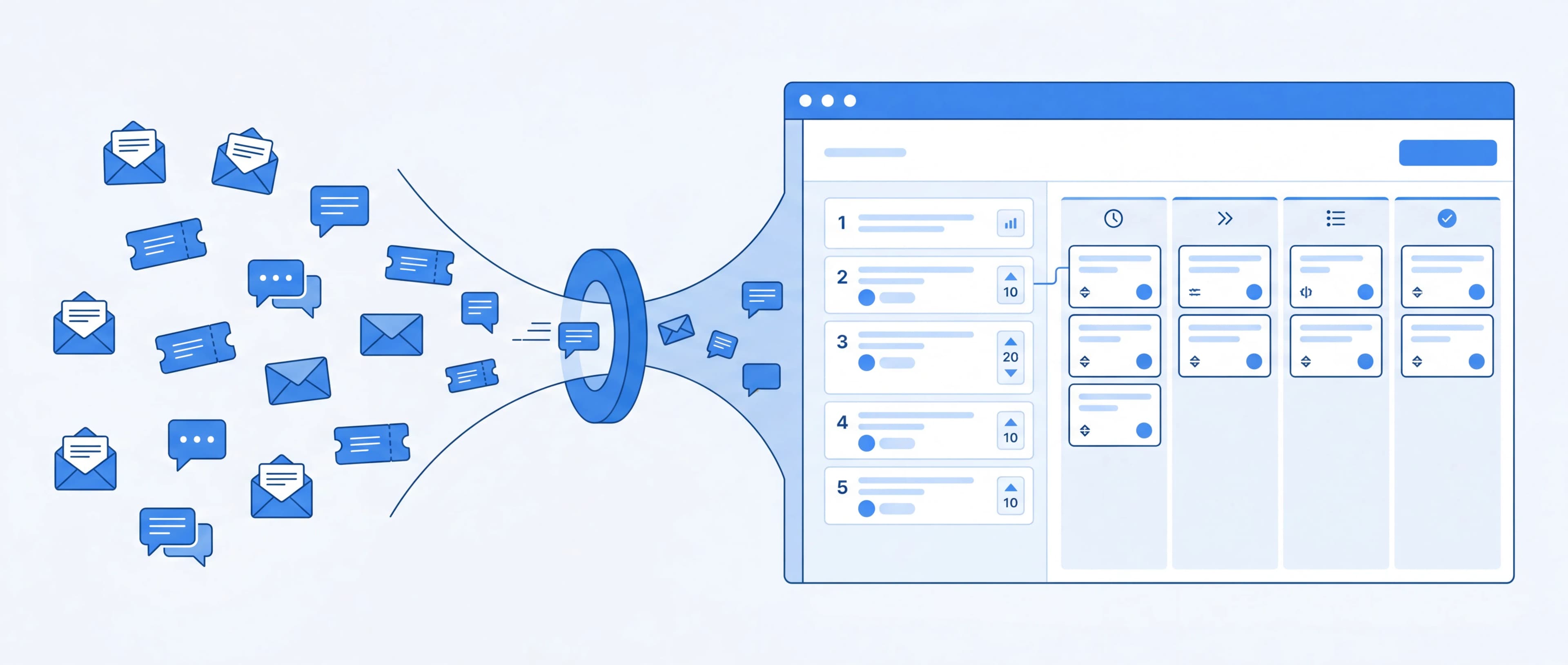
Your users are telling you what to build. The problem is their feedback is scattered across emails, Slack messages, support tickets, and social media, making it nearly impossible to spot patterns or prioritize what matters.
A feedback management tool solves this by centralizing all user input into one place, letting your team organize, vote on, and act on the feedback that moves your product forward.
I've spent the last two years building Feeqd, a feedback management tool, and in the process I've studied every major player in the space. This guide covers everything I've learned: what these tools do, how to choose one, and how to build a feedback workflow that actually drives product decisions.
If you're here to compare options, jump straight to the best feedback management tools in 2026 for a 3-tier breakdown with verified pricing.
What Is a Feedback Management Tool?
A feedback management tool is software that helps product teams collect, organize, prioritize, and act on user feedback in a structured way.
Instead of feedback living in scattered conversations, these tools provide:
- Centralized collection: widgets, forms, boards, and links that funnel feedback into one place
- Organization: categorize feedback by type (bugs, feature requests, general input)
- Prioritization: voting systems and rankings that surface what users want most
- Transparency: public boards and roadmaps that show users their voice matters
- Action: connect feedback directly to your product roadmap
The key difference between a feedback tool and a simple survey is the feedback loop. Surveys collect data and stop. Feedback management tools create a continuous cycle: collect → organize → prioritize → build → communicate back.
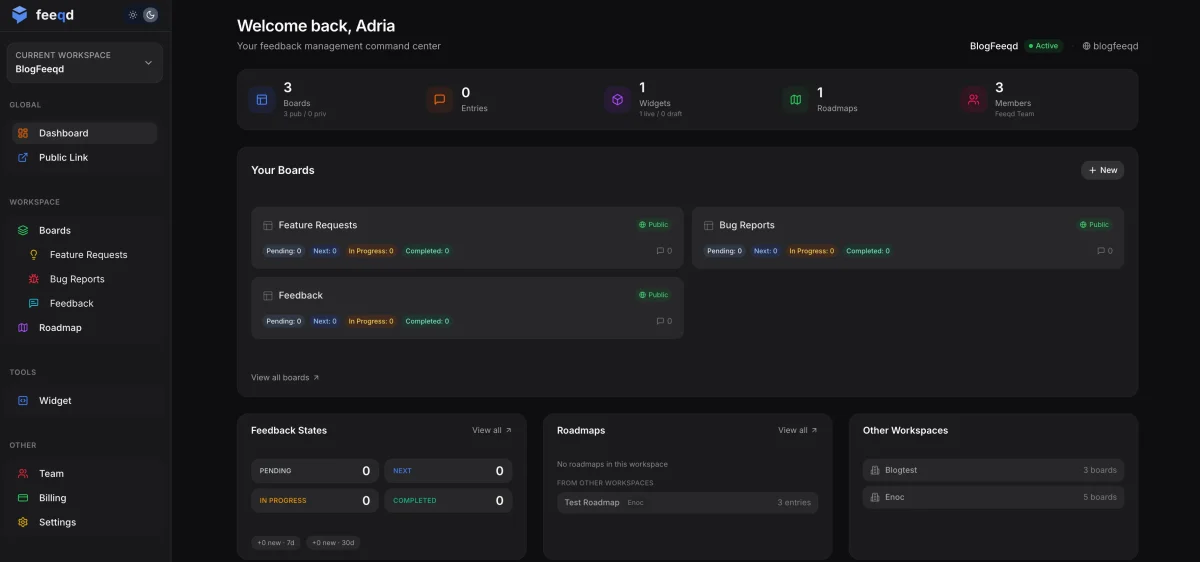
Why Feedback Management Matters
The global customer experience management market reached $16.9 billion in 2025 and continues to grow because companies have learned that ignoring user feedback is expensive. Without a system, product teams face three problems:
1. You build the wrong things
When feedback is scattered, the loudest voices win, not the most important requests. A single enterprise customer's email carries more weight than 200 users quietly wanting the same feature. A feedback tool with voting makes demand visible.
2. Users feel ignored
Users who submit feedback and hear nothing back stop giving feedback. Worse, they churn. Public boards and status updates (Pending → In Progress → Completed) show users their input matters, even if you can't build everything immediately.
3. Your team wastes time
Product managers spend hours manually collecting and deduplicating feedback from multiple channels. A centralized tool eliminates this overhead and gives you data instead of gut feelings.
Types of Feedback Management Tools
Not all feedback tools solve the same problem. Here are the main categories:
Feedback Boards & Voting Platforms
Tools that let users submit ideas and vote on them publicly. Users browse existing requests, add their own, and upvote the ones they care about. The product team gets a ranked list of what matters most, no spreadsheet required.
Best for feature request tracking and community-driven prioritization.
Examples: Feeqd, Canny, Nolt, UserJot
In-App Feedback Widgets
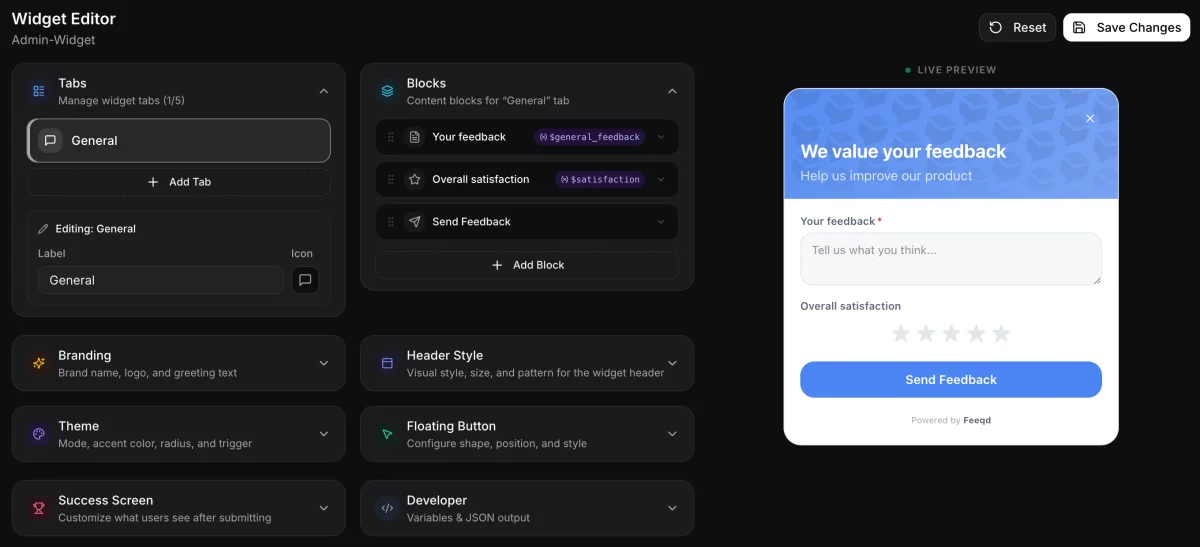
Embeddable widgets that collect feedback without users leaving your product. A small button or tab lives inside your app, and when users click it, they get a form right where they are, with no redirect or context switch.
The key metric here is widget size. A 200KB widget adds noticeable load time to your product. A lightweight one (Feeqd's is 18KB) loads before users notice it's there.
Best for contextual, in-the-moment feedback.
Examples: Feeqd (18KB widget), Survicate, Hotjar
Survey & NPS Tools
Structured questionnaires for measuring satisfaction at scale. These tools are great at quantitative data (NPS scores, CSAT ratings, satisfaction trends over time), but they're not designed for ongoing feature request tracking.
Best for quantitative data and benchmarking.
Examples: Typeform, SurveyMonkey, Delighted
Enterprise Feedback Platforms
Full-suite platforms with AI-powered categorization, CRM integrations, advanced analytics, and custom workflows. These tools handle thousands of feedback items across multiple products and teams, but they come with enterprise pricing and setup complexity.
Best for large teams with complex workflows.
Examples: UserVoice, Productboard, Qualtrics. Note that Productboard removed its public Starter, Pro, and Scale tiers in 2026 and now only surfaces its Spark AI add-on publicly, with core platform pricing behind a sales demo. If you're looking for alternatives to these enterprise tools, check our guides on open source UserVoice alternatives, Canny alternatives, Featurebase alternatives, Frill alternatives, Nolt alternatives, Sleekplan alternatives, and Usersnap alternatives.
All-in-One Tools
Tools that combine multiple feedback channels (boards, widgets, roadmaps) in one platform. Instead of stitching together a survey tool, a board, and a roadmap app, you get the full feedback loop in one place.
Best for small-to-mid teams that want simplicity without sacrificing functionality.
Examples: Feeqd, Frill, ClearFlask
How to Set Up a Feedback Management Workflow
Here's the step-by-step process I recommend based on building and using these tools:
Step 1: Choose your collection channels
Decide how users will submit feedback. Most teams need at least two channels:
- Feedback widget: embedded in your product for contextual input. Users submit feedback without leaving your app, which means higher submission rates and more contextual data.
- Public board: a dedicated page where users can browse existing requests and vote. This doubles as a community hub where users discover that others share their needs.
- Shared links: shareable URLs you can drop in emails, support chats, or social media for quick, frictionless feedback collection.
The best approach is combining channels. A widget captures in-the-moment reactions, a public board captures deliberate feature requests, and shared links capture feedback from users who aren't in your product right now.
Step 2: Create feedback boards by category
Don't dump everything into one board. Create separate boards for different feedback types:
- Feature Requests: product ideas and enhancements
- Bugs & Fixes: issues and broken functionality
- General Feedback: open-ended input that doesn't fit elsewhere
This makes triage faster and reporting cleaner.
Step 3: Enable voting and prioritization
Let users vote on feedback entries. This gives you quantitative signal on demand: instead of guessing which features matter most, you can see exactly how many users want each one.
Look for tools that offer:
- Upvote counts per entry
- Board-level and workspace-wide rankings
- Public visibility so users see they're not alone
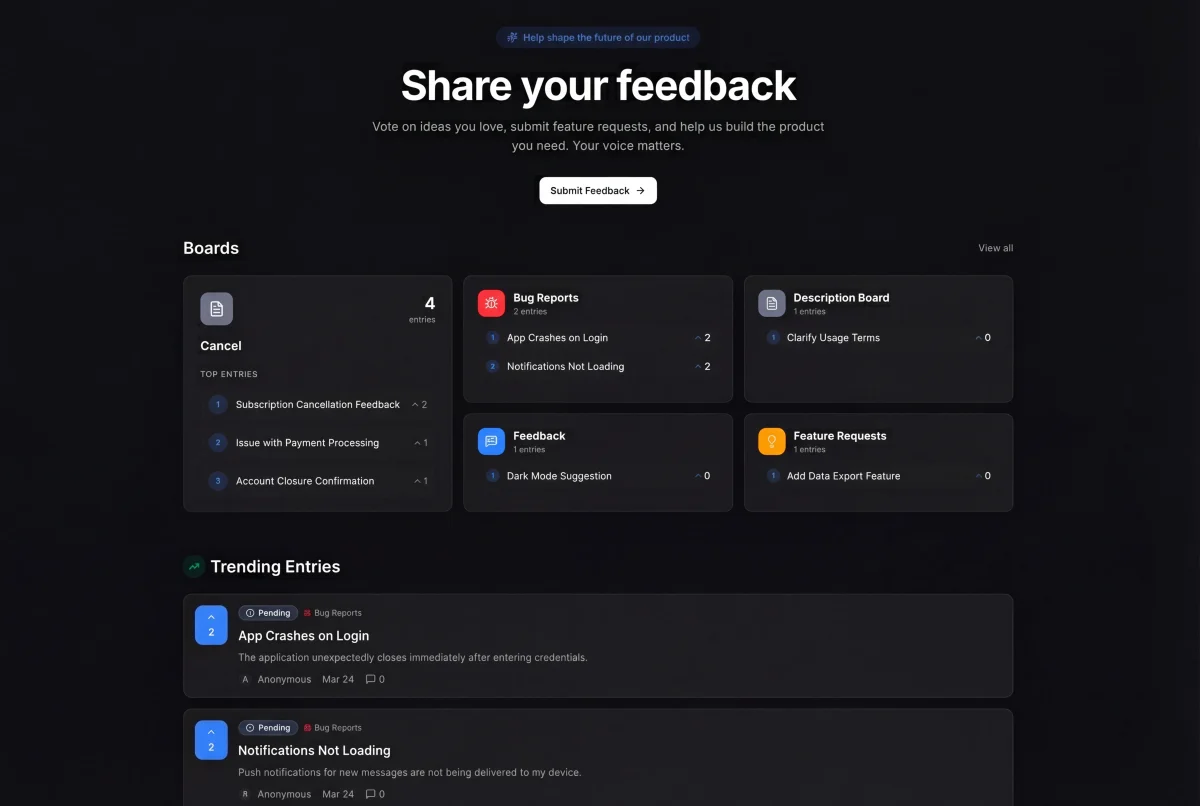
Step 4: Connect feedback to your roadmap
The most important step, and the one most teams skip. Your feedback tool should feed directly into your product roadmap:
- Top-voted entries move to "Next" on your roadmap
- In-progress items show "In Progress" status
- Shipped features update to "Completed"
This closes the feedback loop. Users see their requests move through stages, which builds trust and encourages more (and better) feedback.
Step 5: Communicate back
When you ship a feature that was requested, update the status and notify voters. This single action does more for retention than any marketing campaign.
Best Practices for Feedback Management
Keep the barrier low
The easier it is to submit feedback, the more you'll get. A lightweight widget that loads in milliseconds and requires no login (anonymous feedback) captures more input than a multi-step form.
Don't over-categorize
Start with 3-4 boards maximum. You can always add more later. Too many categories confuse users and create organizational overhead.
Respond to feedback publicly
When you respond on a public board, every other user with the same request sees your response. One reply reaches many users.
Make your roadmap public
A public product roadmap is one of the most powerful trust signals you can offer. It tells users: "We're listening, and here's proof." Companies like Linear and Plausible have built loyal communities partly because their roadmaps are transparent.
Review weekly, not daily
Daily feedback triage leads to reactive product decisions. Set a weekly review cadence where you assess new feedback in aggregate, spot patterns, and make deliberate prioritization calls.
Common Mistakes to Avoid
Building what the loudest user wants
One enterprise customer's feature request isn't necessarily more important than what 50 smaller users are asking for. Use voting data, not volume of emails.
Treating all feedback equally
A bug report from a paying customer is different from a feature suggestion from a free-tier user. Segment feedback by user type when prioritizing.
Collecting feedback without acting on it
A feedback board full of "Under Review" items that never move is worse than having no board at all. If you collect feedback, commit to a process for acting on it.
Ignoring the "why" behind requests
Users often describe solutions instead of problems. "Add a dark mode" might really mean "I use your product at night and the bright screen hurts my eyes." Dig into the underlying need.
Choosing a tool that's too complex
Enterprise platforms with 50 features sound impressive, but if your team is 5 people, you'll spend more time configuring the tool than using it. Start simple and grow.
Not closing the feedback loop
Collecting feedback is only half the job. According to Microsoft's Global State of Customer Service report, 77% of customers view brands more favorably when they proactively invite and act on feedback. If users never hear back about their submissions, they stop contributing.
Best Feedback Management Tools in 2026
Short answer: the best feedback management tools for product teams in 2026 are Feeqd, UserJot, Sleekplan, and ClearFlask for lightweight teams under 10 people; Canny, Featurebase, Frill, and Nolt for mid-market teams; and UserVoice and Productboard for enterprise buyers with procurement budgets. The right choice depends primarily on team size, then on whether you need a free plan, an embedded widget, or open source. Pricing was verified directly from each vendor's pricing page on 2026-05-02.
The "best feedback management tool" depends on team size, budget, and use case. Most listicles fail because they mix four very different categories of "feedback" into one ranking:
- Product feedback (PM teams): feature requests, bug reports, voting boards, public roadmaps. Tools in this guide.
- Customer feedback (CX teams): NPS programs, survey campaigns, sentiment dashboards. See voice of customer software for Qualtrics, Salesforce Feedback Management, Survicate.
- Employee feedback (HR / 360 reviews): performance reviews, anonymous engagement surveys. Look at Lattice, 15Five, or Culture Amp instead.
- Review management (marketing): Google reviews, app store ratings, Yelp. Look at ReviewTrackers or Yotpo instead.
This section compares product feedback tools for PM and product teams. If your use case is one of the other three, the rankings flip entirely. The tier framework below groups 11 tools by pricing model, team size fit, and feature depth. Pricing was verified directly from each vendor's pricing page on 2026-05-02.
Tier 1: Lightweight (solo founders, small teams, tight budgets)
Best fit: 1 to 10 person teams, validating feedback workflows, building public boards without enterprise overhead.
| Tool | Free plan | Starting paid | Per-seat? | Notable |
|---|---|---|---|---|
| Feeqd | Yes (3 boards, 60 entries) | $19/mo | No | 18KB widget + boards + roadmap in one |
| UserJot | Yes (2 boards, unlimited users) | $29/mo | No | Founder-built, anti per-seat philosophy |
| Sleekplan | Yes (Indie forever, 1 seat, watermark) | $13/mo annual | Yes (1/3/10 seats) | Cheapest paid entry, 500K pageviews on free |
| ClearFlask | Yes (open-source self-host, 100 posts cap) | $9/mo License | No | Apache 2.0, same codebase cloud and self-host |
Where each one wins
- Feeqd: the only tool in this tier with a native 18KB widget plus a kanban roadmap on the free plan. If you want widget, boards, and roadmap as one connected system without paying immediately, Feeqd is the path of least resistance. (I built it, so take that with the grain of salt it deserves.)
- UserJot: the cleanest stance against per-seat pricing in the category. If your team grows to 50 users your bill stays flat. The free plan excludes custom domains, which Feeqd's free plan also does. Both tiers force you to upgrade for branded URLs.
- Sleekplan: the cheapest paid entry at $13/mo annual gets you 3 seats, 50GB storage, and 1,000 AI credits. The Indie free plan watermark is the obvious tradeoff. Best for teams that don't mind "Powered by Sleekplan" until they upgrade.
- ClearFlask: the only open-source option here. If you have technical chops to self-host and want unlimited everything for free (capped at 100 posts), this is the answer. Cloud is $29/mo if you'd rather not run servers.
Tier 2: Mid-market (10 to 50 person teams, $30 to $150 per month budget)
Best fit: established teams, brand-conscious, willing to pay for integrations and polish.
| Tool | Free plan | Starting paid | Per-seat? | Notable |
|---|---|---|---|---|
| Canny | Yes (1 board, 100 tracked users, no roadmap) | $79/mo | No | Most-recognized brand, Slack/Jira/Intercom integrations |
| Featurebase | Yes | $29/mo Growth | Yes | Startup Program: 86% off Professional for under-2-year-old companies with under 6 employees |
| Frill | No (14-day trial) | $25/mo (50-idea cap) | No | Modular add-ons (Privacy, Surveys, White-label) |
| Nolt | No (10-day Pro trial) | $29/mo (1 board) | No | Deepest PM integrations: Jira, Linear, Monday, Asana |
Where each one wins
- Canny: brand recognition is real. Buyers who Google "feedback tool" find Canny first, and that's worth something internally when justifying the spend. Where it loses: the free plan excludes the roadmap, paid jumps to $79/mo, and there's no native widget (you embed via iframe).
- Featurebase: the Startup Program is the bombshell most blogs miss. If you're a startup under 2 years old with fewer than 6 employees, you can get Professional at 86% off, which works out to roughly $4 per seat. Without that program, per-seat pricing on a growing team adds up fast.
- Frill: the modular add-on model is unique. Instead of paying for a bundle of features you won't use, you bolt on Privacy ($25), Surveys ($25), or White-label ($100) only when needed. Where it loses: 50-idea cap on the Startup tier feels punitive, and the public footer reads "© 2024" so verify pricing is still current before buying.
- Nolt: the integration list is the deepest in this tier (Jira, Linear, Monday, Asana, plus Zapier/Make/Pabbly on Pro). Where it loses: no free plan, and the cheapest tier is capped at 1 board, so multi-product teams jump straight to $69/mo Pro.
Tier 3: Enterprise (custom contracts, demo required)
Best fit: 50+ person teams with dedicated buying processes, compliance requirements, and budget that crosses $1K/month easily.
| Tool | Pricing | Per-seat? | Notable |
|---|---|---|---|
| UserVoice | $16,000 per year minimum | No (bulk) | Salesforce + Slack + Intercom integrations, revenue-tied analytics, dedicated CSM |
| Productboard | Spark $15/maker/mo + core tiers behind demo | Yes (per maker) | Core Starter/Pro/Scale tiers no longer public in 2026 |
Where each one wins
- UserVoice: the only tool in this comparison where the pricing model assumes you have a procurement team. $16,000 per year minimum is a real number, verified on uservoice.com/pricing 2026-04-25. What you get: Salesforce sync, revenue impact analysis, dedicated success manager. What you don't: a free trial without booking a demo first.
- Productboard: in 2026 Productboard quietly removed its public Starter, Pro, and Scale tiers and now only shows its Spark AI add-on publicly ($15 per maker per month annual, or $19 monthly, with 250 credits per maker). The implication for new buyers is that you're committing to a sales conversation before seeing core platform pricing. Existing customers on legacy plans aren't affected.
For context on enterprise feedback pricing, Salesforce Feedback Management's published price range is $5 to $46,000 per organization per month (the high end being its full enterprise package). The gap between Tier 1 and Tier 3 is often two orders of magnitude, which is why the team-size question matters before any feature comparison.
How to choose: 5 questions
- What's your team size? 1 to 10: Tier 1. 10 to 50: Tier 2. 50+ with procurement: Tier 3.
- Is a free plan a hard requirement? Filters out Frill, Nolt, UserVoice, Productboard.
- Allergic to per-seat pricing? Filters out Sleekplan, Featurebase, Productboard.
- Do you need an embedded widget? Feeqd, Sleekplan, Frill (limited). Canny and most enterprise tools use iframes or no widget at all. See our best feedback widgets comparison for performance benchmarks.
- Need open source? ClearFlask is the only Apache 2.0 option here. For deeper open-source coverage see our open-source UserVoice alternatives guide.
What product teams say on Reddit
The most-cited tools in r/ProductManagement's "best user feedback tools" thread (40+ comments) are Canny, UserJot, Featurebase, and Sleekplan, in that rough order of mentions. Notable absences: Productboard (mentioned mainly for tracking complexity) and UserVoice (mentioned only as "the legacy option we migrated off"). Independent product teams skew toward lightweight and mid-market tools, which matches the tier framework above.
Where Feeqd fits
I built Feeqd, so I'll keep this honest:
- Feeqd wins at: all-in-one workflow (widget + boards + roadmap on one platform without integrations), 18KB widget size (most competitors ship 100KB+), free plan with kanban roadmap (Canny's free plan excludes the roadmap), and custom subdomains per workspace.
- Feeqd loses at: brand recognition vs Canny, deep PM integrations vs Nolt (Linear/Monday/Asana on Pro), AI sentiment analysis vs Enterpret or Productboard Spark, and SOC 2 compliance vs UserVoice on enterprise plans.
- Skip Feeqd if: you need Salesforce sync today, you're already standardized on Productboard's hierarchy, or your team is 100+ engineers and "vendor maturity" is an actual procurement criterion.
Pricing note: All prices in this section verified directly from vendor pricing pages on 2026-05-02. UserJot's
/pricingURL returns 404 (pricing lives at home anchor only). Nolt blocks automated requests. Productboard's pricing page no longer surfaces core tiers. Verify current pricing before buying, especially for tools where vendors have moved pricing behind sales conversations.
Frequently Asked Questions
What is a feedback management system?
A feedback management system is software that centralizes user feedback from multiple channels (widgets, forms, boards, email) into one organized platform. It typically includes features for categorization, voting-based prioritization, status tracking, and public roadmaps to close the feedback loop with users.
What are some popular feedback tools?
The most used feedback management tools in 2026 include Canny, Feeqd, Featurebase, UserJot, Frill, Sleekplan, Nolt, UserVoice, and Productboard. For survey-style customer experience programs, Qualtrics and Survicate are common. The right choice depends on your team size, budget, and whether you need in-app widgets, public boards, or enterprise integrations. See the tiered comparison above for a breakdown by team size.
Are there free feedback management tools?
Yes. Feeqd offers a free plan with 3 boards and 60 entries (with a kanban roadmap included). UserJot's free plan includes 2 boards and unlimited users. Sleekplan's "Indie" plan is free forever for 1 seat with a watermark. ClearFlask is Apache 2.0 open source and free to self-host (capped at 100 posts). Featurebase has a free tier as well. Canny offers a limited free plan (1 board, 100 tracked users) but excludes the roadmap. For most small teams, a free plan is enough to validate the workflow before upgrading.
How much does feedback management software cost?
Pricing spans two orders of magnitude. Lightweight tools start at $0 free or $9 to $29 per month (ClearFlask License, Sleekplan, Feeqd, UserJot). Mid-market tools sit between $25 and $79 per month (Frill, Nolt, Featurebase Growth, Canny Starter). Enterprise tools start at $16,000 per year minimum (UserVoice) or require a sales demo before quoting (Productboard core tiers). Salesforce Feedback Management publishes a range of $5 to $46,000 per organization per month. Verify pricing directly from each vendor before buying. Pricing in this guide was verified on 2026-05-02.
How is feedback management different from customer support?
Customer support is reactive: users report problems, your team resolves them. Feedback management is proactive: you collect ideas, feature requests, and opinions to inform what you build next. Support tools (Zendesk, Intercom) handle tickets. Feedback tools (Feeqd, Canny) handle product direction. Some teams integrate both: when a support ticket reveals a feature gap, it gets moved to the feedback board for tracking and voting.
What features should a feedback management tool have?
At minimum: a way to collect feedback (widget or form), a way to organize it (boards or categories), a way to prioritize it (voting or scoring), and a way to communicate progress (status updates or a public roadmap). Nice-to-haves include anonymous submission support, custom branding, API access, and team collaboration features. Avoid tools that lack a clear path from feedback to action, since collecting without a workflow creates more noise, not less.
How do you prioritize feedback from different user types?
Segment feedback by user type (free users, paying customers, enterprise accounts) and weight votes accordingly. A feature requested by 100 free users and 5 enterprise customers might have different strategic value depending on your business model. The best feedback tools let you analyze voting patterns by user segment so you can make data-driven decisions instead of gut calls.
The Feedback Management Workflow, Visualized
Here's the complete cycle that separates effective feedback management from feedback collection:
Collect → Users submit feedback via widget, public board, or shared link.
Organize → Feedback is automatically categorized into boards (feature requests, bugs, general).
Prioritize → Users vote. Rankings surface the most-wanted features across your entire user base.
Plan → Top-voted entries move to your product roadmap with status tracking (Pending → Next → In Progress).
Build → Your team works on prioritized features with full visibility into user demand.
Communicate → Status updates notify voters. Completed features show as shipped on your public roadmap.
Repeat → Users see their feedback matters, submit more, and the cycle improves over time.
The tools that get this right don't just collect feedback: they create a flywheel where better feedback leads to better products, which leads to more engaged users who give even better feedback.
Related Guides
Looking to go deeper? These guides cover specific aspects of feedback management:
- What Is Product Feedback Management? covers the definition and framework
- How to Build a Feedback System walks through setup step by step
- How to Close the Feedback Loop explains the communication cycle
- How to Track Feedback Impact shows how to measure ROI from feedback
- Featurebase Alternatives: 7 Honest Picks compares the leading feedback tools with pricing transparency
- Best UserVoice Alternatives 2026: Honest Tier Comparison breaks down 8 alternatives by tier with verified pricing
- Best Frill Alternatives 2026: 7 Picks With Real Free Plans ranks Frill alternatives free-first since Frill itself has no free plan
- Best Nolt Alternatives 2026: Free, Paid & Open-Source covers 11 Nolt alternatives, since Nolt has no free plan and caps its entry tier at one board
- Best Sleekplan Alternatives 2026: Free, Paid & Open-Source ranks 11 Sleekplan alternatives, focused on tools that drop the watermark Sleekplan keeps through its $13/mo Starter tier
Start Managing Feedback Today
The best feedback management workflow is the one you actually use. Start with two things: a way to collect feedback (widget or board) and a public roadmap to show users you're listening.
Get started with Feeqd for free
Let your users tell you exactly what to build next
Collect feedback, let users vote, and ship what actually matters. All in one simple tool that takes minutes to set up.
Sign up for free