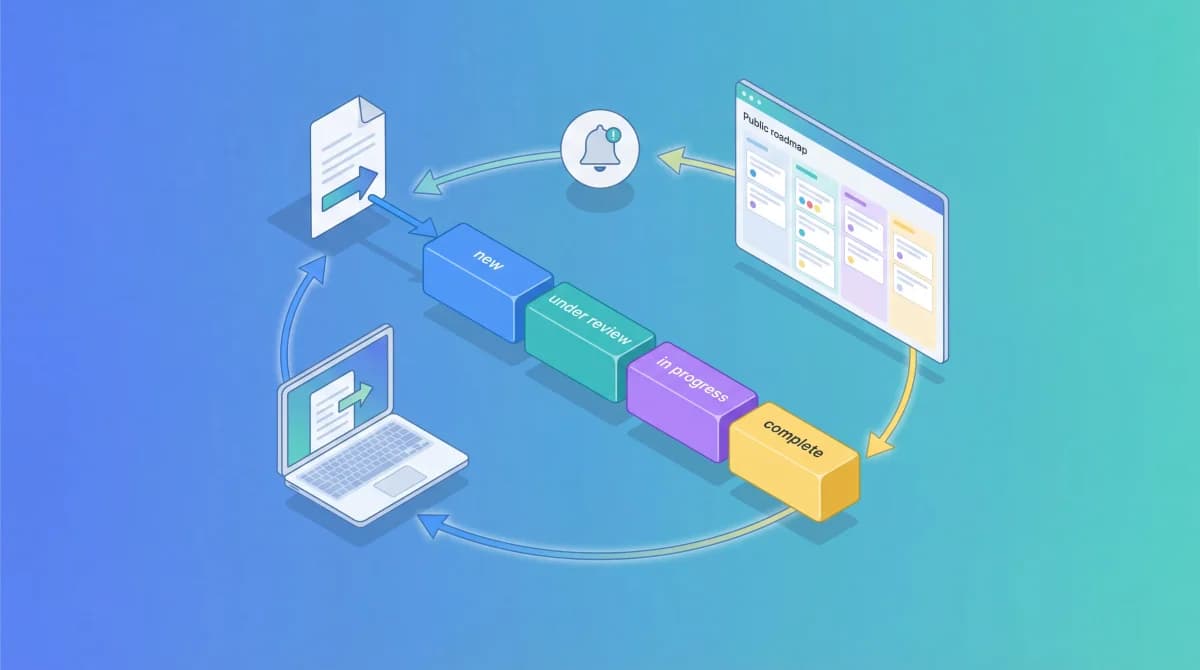
Most teams never fully close the feedback loop. A user takes three minutes to describe a problem, submits it, and then hears nothing back.
Two months later, you ship the exact fix they requested. But that user already churned. They stopped giving feedback weeks ago because the experience felt like shouting into a void.
That's the cost of not closing the feedback loop. You collect feedback, you might even act on it, but you never communicate back to the person who submitted it. The result: users stop trusting you with their input, and you lose the signal you need to build the right product.
Why Closing the Loop Matters
"Closing the feedback loop" means completing the full cycle: collecting feedback, acting on it, and communicating the outcome back to the person who submitted it. Most teams only do the first two steps. The third step, communication, is where trust gets built or broken.
Here's what's at stake:
- User retention drops. Customers who feel ignored are more likely to churn. If someone reports a bug and never hears back, they assume you don't care.
- Feedback quality degrades. When users see that their input leads nowhere, they stop giving detailed, thoughtful feedback. You end up with fewer submissions and lower quality ones.
- Trust erodes silently. Users won't tell you they've lost trust. They'll just disengage. By the time you notice the drop in engagement, it's too late.
The good news: closing the loop doesn't require a complex process. It requires visibility and communication, both of which can be systematized.
Step-by-Step: How to Close the Feedback Loop
Step 1: Acknowledge Every Submission
The loop starts the moment a user submits feedback. If they don't get an immediate acknowledgment, they'll wonder whether it went through at all.
Set up an automated confirmation for every submission. This can be as simple as a success screen in your feedback widget or an automated email. The message doesn't need to promise anything specific, just confirm receipt and set expectations.
Something like: "Thanks for your feedback. Our team reviews every submission and we'll update the status as we make progress."
This takes 30 seconds to set up and handles the most critical moment: right after the user invested effort in writing their feedback.
Step 2: Track Feedback Through a Status Workflow
Acknowledgment alone isn't enough. You need a system that tracks each piece of feedback through defined stages so nothing falls through the cracks.
A simple four-stage workflow works for most teams:
- Pending - Feedback received, not yet reviewed
- Next - Reviewed and planned for upcoming work
- In Progress - Actively being worked on
- Completed - Shipped and ready for users
In Feeqd, every feedback entry moves through these four statuses. Your team updates the status as work progresses, and those updates become visible to users (more on that in Step 3).
The key is discipline: every feedback item should have a current status. If you're not going to act on something, mark it accordingly. Users respect honesty more than silence.
Step 3: Make Progress Visible with a Public Roadmap
This is where most teams drop the ball, and where the biggest opportunity lives. Instead of communicating progress through individual emails or Slack messages, make your entire roadmap public.
A public roadmap gives users a live view of what's being worked on. When a user submits a feature request and it moves from "Pending" to "Next" to "In Progress," they can see that progression in real time without you sending a single manual notification.
In Feeqd, public roadmaps display as a Kanban board with four columns matching the status workflow. Users visit your roadmap at yourcompany.feeqd.com/r/roadmap-id and see exactly where things stand. They can also view it as a list for a more compact overview.
Public roadmaps close the loop at scale. Instead of emailing 50 users who requested a feature, you update one status and all 50 can see it. This approach also builds transparency: prospective users can check your roadmap before signing up to see how actively you ship.
Step 4: Notify Users When Their Request Ships
Public visibility is the foundation, but direct notification is the closer. When a feature request moves to "Completed," the users who submitted or voted on it should know.
This is the moment that turns passive users into advocates. Someone requested CSV export six weeks ago, and now they get a notification saying it shipped. That experience builds loyalty in a way that no marketing campaign can match.
Pair the notification with context: what shipped, how it works, and where to find it. A status change notification that says "Completed" with no detail is better than nothing, but adding a sentence about what was built makes it significantly more impactful.
Step 5: Ask for Follow-Up Feedback
Closing the feedback loop isn't a one-time event. It's a continuous cycle. After shipping a feature, ask the users who requested it whether the implementation meets their needs.
This follow-up does two things:
- Catches gaps early. Maybe you built CSV export but users actually needed scheduled exports. Catching this right after launch is far cheaper than discovering it three months later.
- Reinforces the loop. When users see that you not only shipped their request but also followed up to ask if it's right, they become your most engaged feedback contributors going forward.
Connect this back to your feedback boards. Post-launch feedback creates new entries that feed into your next planning cycle. For a deeper look at how voting data drives roadmap priorities, see how to use customer feedback for product roadmaps.
Tools That Help Close the Loop
Not every feedback tool supports the full loop. Here's how the main options compare on the features that matter for closing it:
| Tool | Public Boards | Public Roadmap | Status Workflow | Free Plan | Starting Price |
|---|---|---|---|---|---|
| Feeqd | Yes (custom subdomain) | Kanban + List | 4 statuses | Yes (3 boards, 60 entries) | $19/mo |
| Canny | Yes | Yes (+ Changelog) | Yes | No | $99/mo |
| UserVoice | Limited | No public roadmap | Yes | No | Custom (enterprise) |
| Nolt | Yes | No | Limited | No | $29/mo |
The critical differentiator is whether the tool connects feedback collection to a public roadmap with status updates. That connection is what makes the loop closeable at scale, rather than requiring manual outreach for every status change.
Feeqd's approach links feedback boards directly to public roadmaps on a custom subdomain (yourcompany.feeqd.com). Users submit feedback on a board, vote on existing requests, and watch items move through the roadmap as your team works on them. The entire loop happens in one place.
FAQ
How do you close the feedback loop?
Closing the feedback loop means completing the cycle from collection to communication. Collect feedback, track it through a status workflow (Pending, Next, In Progress, Completed), make progress visible on a public roadmap, and notify users when their request ships. The key is the communication step: users need to see that their input led to action.
What is an example of closing the feedback loop?
A user submits "Add dark mode" through your feedback widget. Your team reviews it and moves the status to "Next." The user checks your public roadmap and sees dark mode is planned. Two weeks later, the status changes to "In Progress." When it ships, the status updates to "Completed" and the user gets a notification. They try it out and leave follow-up feedback about contrast settings, starting the next cycle.
How is a feedback loop different from an audio feedback loop?
In product and business contexts, "feedback loop" refers to the cycle of collecting user input, acting on it, and communicating results. This is different from the technical term in audio engineering, where a feedback loop is the screeching sound caused by a microphone picking up its own output from a speaker. If you're dealing with audio feedback, the fix is adjusting microphone placement or using a noise gate, not a roadmap tool.
Why do users stop giving feedback?
The most common reason is silence. When users submit feedback and never hear back, they conclude that nobody reads it. According to Microsoft's Global State of Customer Service report, over 90% of consumers say customer service (including responsiveness to feedback) influences their brand loyalty. A visible feedback workflow with status updates solves this by showing users that every submission gets tracked.
Get started with Feeqd for free
Let your users tell you exactly what to build next
Collect feedback, let users vote, and ship what actually matters. All in one simple tool that takes minutes to set up.
Sign up for free