I used to build features based on gut feeling. A customer would email about a missing integration, a teammate would mention something they saw on Twitter, and suddenly that became the next sprint priority. No data, no validation, just whoever spoke last.
The result? We'd ship features that 3 people wanted while ignoring requests that hundreds of users had been quietly asking for. Using customer feedback to build your product roadmap sounds obvious, but most teams don't have a system for it. They have scattered inputs and good intentions.
This guide walks through the exact process I use with Feeqd to turn raw customer feedback into prioritized roadmap items. Every step is practical, and the core idea is simple: let your users tell you what matters most through their votes, not through the volume of their complaints.
If you've already been collecting survey data, you might also want to check out how teams use survey responses for roadmap decisions.
What You'll Need
Before starting, you need three things in place:
- A feedback collection channel. Somewhere users can submit requests, report bugs, and share ideas. This could be an embedded widget, a shared link, or a public board.
- A voting system. The mechanism that turns individual opinions into quantified demand. Without votes, you're back to guessing which feedback matters most.
- A roadmap tool. A place to organize what you're building, connect it to the feedback that inspired it, and communicate progress back to users.
You can piece these together from separate tools, or use a feedback management tool that combines all three. I'll use Feeqd in the examples since that's what I built and know best.
Step 1: Collect Feedback in One Place
The first problem to solve is fragmentation. Right now, your feedback probably lives in five different places: support emails, Slack messages, Twitter DMs, meeting notes, and maybe a Google Form you set up six months ago.
Pick one system and route everything there. In Feeqd, this means creating feedback boards organized by type:
- Feature Requests for new functionality
- Bugs & Fixes for reported issues
- General Feedback for open-ended input
- Custom boards for anything specific to your product
Each board becomes a dedicated inbox for one category of feedback. When a user submits "I wish I could export to CSV," that becomes a trackable entry on your Feature Requests board with a status (Pending, Next, In Progress, or Completed).
For collection, you have a few options depending on where your users are:
- Embed a widget directly in your product. Feeqd's widget is 18KB, so it loads before users even notice it. They submit feedback without leaving your app.
- Share a public board link for users who aren't logged into your product. Post it in your community, newsletter, or social channels.
- Use both. The widget captures in-context feedback (a user hits a bug and reports it immediately), while public boards capture feature ideas from users who are thinking about your product more broadly.
The key is reducing friction. Every extra step between "I have feedback" and "I submitted it" costs you valuable input.
Step 2: Let Users Vote on What Matters
This is the step most teams skip entirely, and it's the one that changes everything.
Collecting feedback tells you what users want. Voting tells you how badly they want it. Those are fundamentally different signals.
When feedback entries live on a board with community voting, your users can upvote the items they care about. Instead of reading 200 feature requests and trying to rank them mentally, you let your user base do the prioritization for you.
Here's what this looks like in practice:
- A user submits "Add Slack integration" to your Feature Requests board
- Over the next few weeks, 87 other users see this entry and upvote it
- Meanwhile, "Add dark mode" gets 12 votes and "Custom email templates" gets 43
Now you have quantified demand. The PM meeting changes from "I think Slack integration is important" to "87 users voted for Slack integration, making it our top-requested feature."
Board-level rankings make this even clearer. Instead of scrolling through individual entries, you can see all items ranked by vote count. The pattern becomes visible at a glance.
One thing I've learned building this: voting reveals surprises. Features that internal teams assume are high-priority often rank low, while seemingly small requests (faster load times, better keyboard shortcuts) accumulate votes quietly. That's exactly the kind of insight you miss when you rely on gut feeling or the loudest voice in the room.
Step 3: Categorize and Tag Feedback
Votes tell you what's popular. But before moving items to your roadmap, you need to understand the themes behind the votes.
Go through your highest-voted items and look for clusters:
- Are multiple entries really asking for the same thing in different words? ("Add Slack integration," "Slack notifications," and "Send updates to Slack" are all one request.)
- Do certain categories dominate? If 60% of your top-voted items are about integrations, that's a theme worth prioritizing as a whole, not just individual features.
- Are there quick wins hiding in the data? Some highly-voted items might take a day to implement while others need a quarter.
This is where having organized boards pays off. If your Feature Requests board shows that integrations dominate the top 10, while your Bugs board shows that performance issues cluster together, you can plan your roadmap around themes rather than individual tickets.
I recommend a simple tagging approach:
- Theme tags (integrations, performance, UI/UX, mobile)
- Effort tags (quick win, medium, large)
- Segment tags if you track who's voting (free users vs. paid, small teams vs. enterprise)
The combination of vote count + theme + effort gives you everything you need for the next step.
Step 4: Build Your Roadmap from Voting Data
Now comes the part where feedback becomes a plan. You've collected input, quantified demand through votes, and identified themes. Time to create your roadmap.
In Feeqd, you can create roadmaps and link feedback entries directly to them. Each entry carries its vote count, status, and context with it. Your roadmap isn't an abstract list of initiatives, it's backed by real user demand.
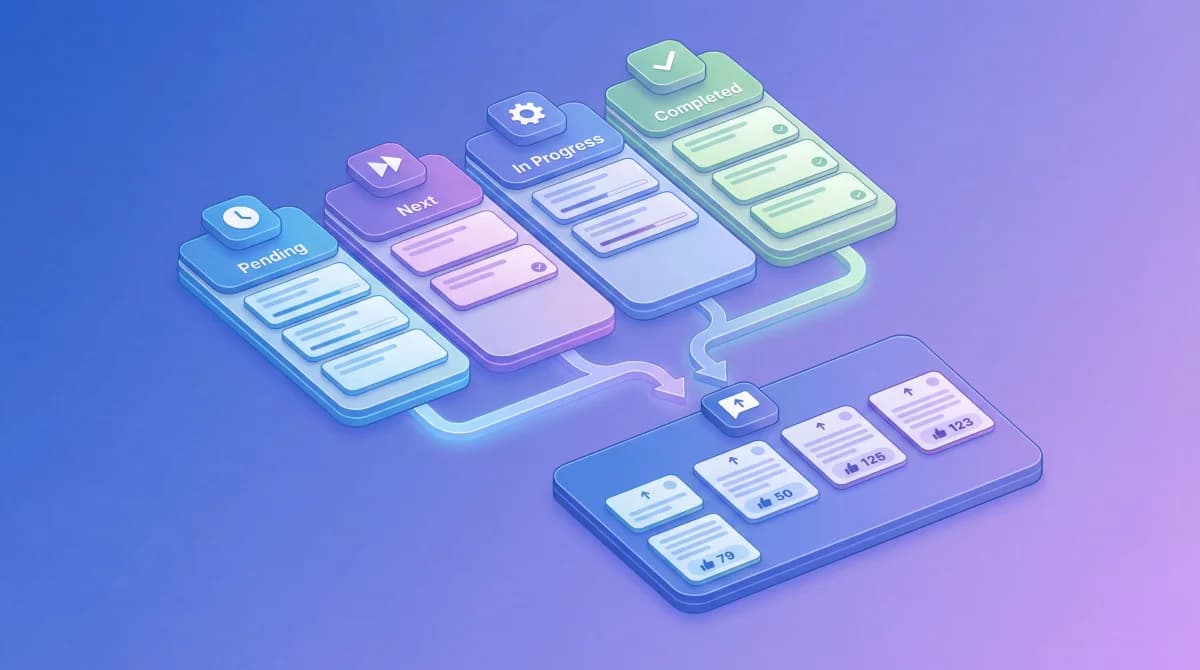
The roadmap uses a Kanban view with four columns that map to your entry statuses:
- Pending: acknowledged but not yet planned
- Next: committed for an upcoming cycle
- In Progress: actively being built
- Completed: shipped and ready
To decide what moves from Pending to Next, I use a simple framework combining votes with effort:
- Sort by votes. Start with your highest-voted items across all boards.
- Group by theme. If three of your top five items are about integrations, that's your next initiative, not three separate tickets.
- Factor in effort. A quick win with 30 votes might deliver more value this sprint than a massive project with 50 votes that takes three months. Research like the RICE scoring framework from Intercom can help formalize this, but votes give you the "Impact" component for free.
- Check strategic alignment. Votes are a strong signal, not the only signal. If your company strategy says "go enterprise this quarter," weight enterprise-user votes higher.
The result is a roadmap where every item traces back to real feedback with real vote counts. When someone asks "why are we building this?", the answer is concrete: "142 users requested it, it's our second most-voted feature, and it fits our Q2 theme of better integrations."
Step 5: Close the Loop with Status Updates
Building what users asked for is only half the job. The other half is telling them you did it.
A public roadmap lets your users see what's Pending, what's Next, what's In Progress, and what's Completed. This transparency does three things:
- Reduces duplicate requests. Users can see that "Slack integration" is already In Progress, so they don't submit it again.
- Builds trust. When users see their voted items moving through statuses, they know their feedback actually matters. They keep coming back and keep voting.
- Creates accountability. Your team has a public commitment. Items don't sit in "Next" indefinitely because users can see them.
Each time you update an entry's status (say, moving "Slack integration" from Next to In Progress), everyone who voted for it can see the change. That's the feedback loop in action.
I wrote more about this in the guide on how to close the feedback loop, and in how teams use survey responses for roadmap decisions.
Common Mistakes to Avoid
Even with a solid feedback-to-roadmap system, a few patterns can trip you up:
Treating all feedback equally
Not every vote carries the same weight. Ten votes from paying enterprise customers might be worth more than 50 from free-tier users who never convert. If your tool lets you segment voters, use it. Context matters alongside raw numbers.
Ignoring qualitative context
Votes tell you what users want but not always why. A feature request with 80 votes and a detailed comment explaining the pain point is more informative than one with 100 votes and no context. Read the comments, not just the numbers.
Building for one loud customer
This is the classic trap. A single large customer threatens to churn unless you build their specific request. Before you drop everything, check the votes. If their request has 2 upvotes, it means your broader user base doesn't share the need. You can address the customer's concern directly without reshaping your roadmap around one voice.
Never saying no
A roadmap built purely from votes becomes a feature factory. You still need a product vision. Use feedback data to inform decisions, not to abdicate them. The most effective PMs I've seen use votes as one input alongside business goals, technical constraints, and product strategy.
FAQ
How do you use customer feedback to improve a product?
Collect feedback in a centralized system (like a feedback board), let users vote on what matters most, then prioritize your development roadmap based on that quantified demand. The key is connecting feedback directly to what you build, not just reading it and filing it away.
How does customer feedback impact product development?
Customer feedback shifts product development from assumption-driven to evidence-driven. Instead of PMs guessing which features matter, voting data shows exactly what users want and how many of them want it. According to Harvard Business Review research on customer-centric companies, businesses that systematically act on customer input see higher retention and lower churn.
How can customer feedback improve your product roadmap?
It replaces gut-feeling prioritization with data. When every roadmap item links back to voted feedback entries, your team can justify priorities with numbers ("87 users requested this") instead of opinions. It also reduces wasted effort: you stop building features nobody asked for.
How do you use feedback to improve sales?
Public roadmaps and active feedback boards show prospective customers that you listen and ship. When a prospect asks "do you plan to add X?", you can point them to your roadmap where X is already In Progress with 50 votes. That's more convincing than any sales pitch.
Get started with Feeqd for free
Let your users tell you exactly what to build next
Collect feedback, let users vote, and ship what actually matters. All in one simple tool that takes minutes to set up.
Sign up for free