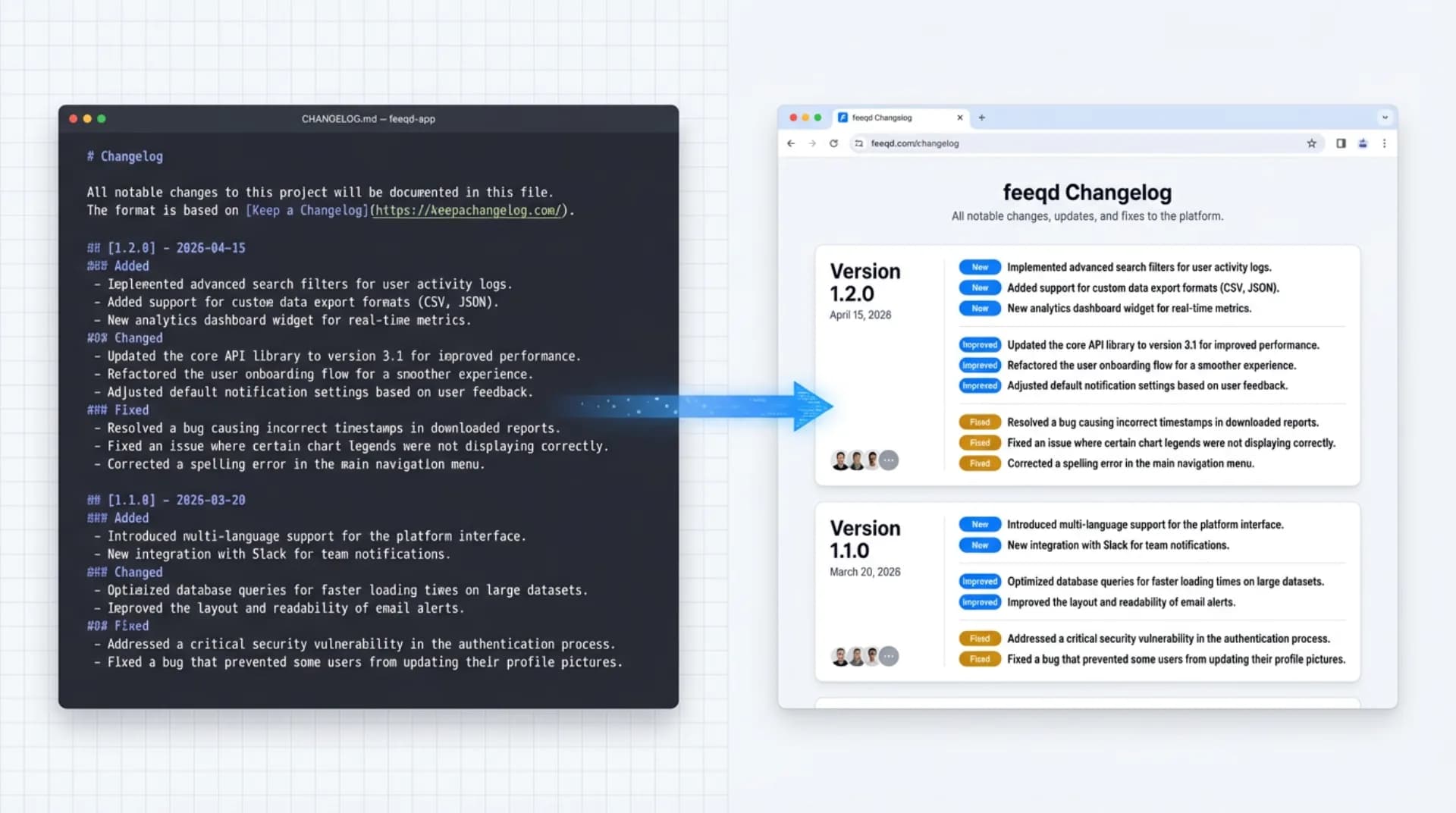
Search "changelog template" and you get two kinds of results that don't talk to each other. On one side: the Keep a Changelog spec, a one-page standard that tells you how to structure entries. On the other: listicles linking to generic Excel and Notion files that ignore the spec entirely.
Neither side gives you what you actually need: a changelog template you can copy-paste today, aligned with the one format that tools and AI assistants already parse, scaled from a single README to a live public changelog page.
This guide covers five copy-paste formats, the Keep a Changelog rules behind them, and the upgrade path from a static CHANGELOG.md in your repo to a user-facing changelog page. I've maintained Feeqd's changelog across both surfaces for two years. What follows is what I'd hand a teammate on day one.
What Is a Changelog?
A changelog is a curated, chronologically ordered record of notable changes to a project. It sits at a stable location (usually CHANGELOG.md in a repo root or /changelog on a product site) and groups changes by version. It isn't a commit log: git already has that. The job of a changelog is to translate raw commits into a short list that a human (or an LLM summarizing your product) can read top-to-bottom and know what's new, what broke, and what's gone.
Changelogs are distinct from release notes templates: release notes are audience-facing communication distributed across channels (email, in-app, Slack), while a changelog is the canonical ledger. Most product teams produce both, and the changelog feeds the release notes.
The Keep a Changelog Standard
Keep a Changelog is a one-page specification, maintained by Olivier Lacan since 2014, that defines how to structure a CHANGELOG.md file. It has become the de facto standard for open-source projects. Its core principles:
- Changelogs are for humans, not machines. A
git log --onelinedump is not a changelog. - Every version gets an entry. Even patch versions.
- Group changes by type. The spec defines six:
Added,Changed,Deprecated,Removed,Fixed,Security. - Newest version at the top. Readers scan top-to-bottom.
- Link versions when possible. GitHub compare URLs or deep links to the release page.
- Use ISO dates.
YYYY-MM-DD, no ambiguity. - Pair with Semantic Versioning. Version numbers should mean something (see semver.org).
Every template below respects these rules. If you only remember one, remember the six categories: they map cleanly to what users need to act on, and skipping them is the main reason "changelog" entries become unreadable within a year.
5 Copy-Paste Changelog Templates
Template 1: Standard Keep a Changelog (Markdown)
The default format. Use for open-source projects, internal libraries, SDKs, and anywhere a CHANGELOG.md file lives in a repo.
# Changelog

All notable changes to this project will be documented in this file.

The format is based on [Keep a Changelog](https://keepachangelog.com/en/1.1.0/),
and this project adheres to [Semantic Versioning](https://semver.org/spec/v2.0.0.html).

## [Unreleased]

### Added
- Placeholder for the next release.

## [1.2.0] - 2026-04-15

### Added
- Export feedback entries to CSV (fixes #234).
- Dark mode for the admin dashboard.

### Changed
- Widget bundle reduced from 24KB to 18KB.

### Fixed
- Modal close button now responds to Escape key on Safari.

### Security
- Updated `lodash` from 4.17.20 to 4.17.21 (CVE-2021-23337).

## [1.1.0] - 2026-03-28

### Added
- Conditional logic for widget form blocks.

### Deprecated
- `widget.v1Init()`: use `FeeqdWidget.init()` instead. Removal in 2.0.0.

[Unreleased]: https://github.com/owner/repo/compare/v1.2.0...HEAD
[1.2.0]: https://github.com/owner/repo/compare/v1.1.0...v1.2.0
[1.1.0]: https://github.com/owner/repo/releases/tag/v1.1.0
Why this works: It uses all six spec categories (Added, Changed, Deprecated, Removed, Fixed, Security), keeps an [Unreleased] section at the top as a staging area, and includes version-compare links at the bottom so readers can jump to the exact diff. This is the template I'd pick by default if you have no other constraints.
Template 2: Minimal Changelog for Small Projects
Use when your repo has few releases, a single maintainer, or you're starting from zero and the full spec feels heavy.
# Changelog

## 0.3.0 - 2026-04-10
- Add: widget preview mode.
- Fix: emoji rendering on Windows Chrome.

## 0.2.1 - 2026-03-18
- Fix: null pointer in the onboarding wizard.

## 0.1.0 - 2026-02-01
- Initial release.
Why this works: It drops the category headings in exchange for inline Add: / Fix: / Change: prefixes. The six-category rule still exists, just expressed per bullet. This is legal under the spec and dramatically easier to maintain solo. Upgrade to Template 1 the moment you have more than ten entries per release.
Template 3: Semantic Versioning Changelog for Libraries and SDKs
Use for packages published to npm, PyPI, Cargo, Hex, or anywhere consumers pin versions and care about breaking changes.
# Changelog

## 2.0.0 - 2026-04-20

### BREAKING CHANGES
- `FeeqdWidget.init()` now requires a `widgetId` option. Pass the ID you get
  from the dashboard. **Migration:**
  - Before: `FeeqdWidget.init({ apiKey: 'xxx' })`
  - After:  `FeeqdWidget.init({ widgetId: 'xxx' })`
- Drop support for Node < 18.

### Added
- ESM exports alongside CJS.

### Fixed
- Type exports for `WidgetConfig` now resolve under `moduleResolution: "bundler"`.

## 1.5.2 - 2026-03-30

### Fixed
- Widget no longer throws when `window.localStorage` is disabled.

## 1.5.1 - 2026-03-22

### Security
- Bump `ws` to 8.17.1 (CVE-2024-37890).
Why this works: A dedicated BREAKING CHANGES block at the top of each major version is the thing consumers read first. Migration snippets are inline, so the changelog is also the migration guide. Patch and security-only releases stay short. This format is what libraries like Zod, Tailwind CSS, and Astro use with minor cosmetic differences.
Template 4: Product Changelog for a Public Page
Use for user-facing SaaS products at /changelog, where readers are customers, prospects, and AI crawlers. Less technical jargon, more benefit framing.
## April 20, 2026 (v3.4)

### New
- **Bulk export.** Download any board's feedback as CSV in one click. Great for
  quarterly reviews and investor updates.
- **Email digest.** Weekly summary of top-voted entries, sent to admins.

### Improved
- Widget loads 35% faster on mobile (median LCP now 210ms).
- Board filters now remember their state across sessions.

### Fixed
- Fixed a bug where drag-and-drop reordering occasionally reset on refresh.

---

## April 6, 2026 (v3.3)

### New
- **Public roadmap view.** Make any roadmap public with one toggle. Closes the
  loop with users who voted on the feature.

### Improved
- Notifications are now grouped per board instead of flat.

### Fixed
- Mobile widget no longer overlaps bottom navigation bars on iOS Safari.

[Subscribe to updates](https://feeqd.com/changelog)
Why this works: It still follows Keep a Changelog (the Added / Changed / Fixed structure is preserved, just renamed for a user audience), but drops the version-compare links and adds benefit framing on each entry. Each release has its own date heading so users can link to a specific release socially. The Subscribe to updates line turns the changelog into a distribution channel.
Template 5: Team-Facing Changelog for Slack or Notion
Use for internal weekly updates, async standups, or Slack channel recaps. Optimize for scan speed.
**This week in {Product}** (week of 2026-04-14)

**Shipped**
- Bulk CSV export (requested by 14 users in board #feature-requests)
- Widget mobile LCP: 320ms → 210ms

**In review**
- Email digest (PR #812, targeting next week)

**Rolling back**
- Drag-and-drop reordering fix (caused regression in Firefox, reverted Tuesday)
Why this works: Teammates care about what shipped this week and what's next, not cumulative version history. This format is disposable: it lives in Slack or a Notion page, gets replaced weekly, and references the canonical changelog by link. I've run Feeqd's internal updates in this exact format for the last eighteen months, and it's the one template engineers actually read.
Which Changelog Template Should I Use?
Match the template to the project, not the other way around:
| Project type | Template | Location |
|---|---|---|
| Open-source library / SDK | Template 1 or 3 | CHANGELOG.md in repo root |
| Internal tool, small team | Template 2 | Repo README or wiki |
| npm / pip / cargo package | Template 3 | Repo root + GitHub Releases |
| SaaS product with users | Template 4 | Public /changelog page |
| Internal weekly recap | Template 5 | Slack, Notion, or email |
Most teams end up running two at once: a technical changelog in the repo (Template 1 or 3) and a user-facing changelog on the product site (Template 4). The second is usually derived from the first: you ship a release, update CHANGELOG.md, then summarize the user-visible pieces on the product page.
From Static Changelog to Live Changelog Page
Here's the part most "changelog template" articles skip: a static CHANGELOG.md is the starting line, not the finish. The moment you have users, the changelog has a second job: driving engagement and closing the feedback loop with people who requested what you just shipped.
Three upgrades take you from a text file to a product surface:
- Render the markdown at a stable URL.
/changelogon your main domain or a subdomain likeupdates.yourproduct.com. Any static-site generator (Astro, Next.js, Fumadocs) handles this with a loop over a directory of MDX files. YourCHANGELOG.mdbecomes the content source. - Link each entry to the feedback request that triggered it. If you use a feedback board, every completed request has a URL. Add a
Requested by {N} userslink to each bullet. This is the whole purpose of closing the loop: the person who voted for CSV export on March 2 gets a notification on April 20 when it ships. - Announce releases inside the product. Use an in-app widget or notification center that surfaces new changelog entries to logged-in users. A changelog that only exists on a page nobody visits is a README in hiding.
At Feeqd we run this exact flow. The widget ships from the same repo as the changelog file, and publishing a new version triggers both the /changelog rebuild and an in-app notification to users who voted for any of the shipped items. The number I care about is feedback-to-ship latency: how long between a user submitting a request and that user getting notified it shipped. A live changelog page drops that latency by days. A static CHANGELOG.md leaves it at "whenever someone checks GitHub."
If you're writing your first changelog today, start with Template 1 in a CHANGELOG.md file. Once you have users asking for things, layer Template 4 on top as a public page. You don't need to rebuild, since the markdown file is the data source for both.
FAQ
How do I structure a changelog?
Group entries by version, newest at the top, with an ISO date (YYYY-MM-DD) next to each version number. Inside each version, group changes into six categories from the Keep a Changelog spec: Added, Changed, Deprecated, Removed, Fixed, Security. Keep an [Unreleased] section at the top as a staging area between releases.
How do I make a good changelog?
Follow six principles from Keep a Changelog: changelogs are for humans, every version gets an entry, group changes by type, newest version first, show the release date, and make versions linkable. Beyond that: write entries in plain language, not commit messages. "Fixed a bug where the modal didn't close on Escape" beats "fix: handle keydown in modal (#412)."
Is there a standard format for changelogs?
Yes. Keep a Changelog is the de facto standard used by tens of thousands of open-source projects. It defines six category headings, ISO date format, and newest-first ordering. Paired with Semantic Versioning, it gives consumers a predictable contract: a MAJOR bump means breaking changes, a MINOR bump adds backward-compatible features, and a PATCH bump is fixes only.
What's the difference between a changelog and release notes?
A changelog is a cumulative, chronologically ordered record at a stable URL: the canonical ledger. Release notes are audience-facing communication about a specific release, distributed across channels like email, in-app notifications, and Slack. Release notes are derived from the changelog, formatted and filtered for the audience. See our full release notes template guide for 10 audience-specific formats.
Should the changelog file be at the repo root?
Yes, by convention. CHANGELOG.md at the repo root is what package registries (npm, PyPI, crates.io) and IDEs look for automatically. Some projects split by year (CHANGELOG-2026.md, CHANGELOG-2025.md) once the file gets long, but keep the main file as an index.
How often should I update the changelog?
With every release, without exception. The Keep a Changelog principle "there should be an entry for every single version" exists because retroactive changelogs are unreliable: you forget what shipped in 1.3.2 by the time you're writing 1.4.0. The cheap habit is adding to the [Unreleased] section as part of the PR that introduces the change, so the changelog updates itself as work merges.
What does changelog mean?
A changelog is a file (or page) listing notable changes made to a software project, in chronological order, grouped by version. The term comes from "change" plus "log," and in modern usage it almost always refers to the Keep a Changelog format: a markdown file at the root of a repository with dated version headings.
How do I generate a changelog file automatically?
Three common options. First, git-cliff or conventional-changelog parse Conventional Commits and produce a CHANGELOG.md on every release. Second, Changesets lets contributors attach a changelog entry to each PR and assembles them at release time. Third, GitHub Releases has a built-in "Generate release notes" button that groups merged PRs by label. Auto-generation gets you 80% there; always edit the output to match the six Keep a Changelog categories before shipping.
Get started with Feeqd for free
Let your users tell you exactly what to build next
Collect feedback, let users vote, and ship what actually matters. All in one simple tool that takes minutes to set up.
Sign up for free