A feedback widget is a small UI element embedded directly in your product that lets users submit feedback without leaving the page. Instead of forcing users to find a support email or navigate to a separate portal, the widget meets them where they already are.
I built Feeqd's feedback widget from scratch because every option I tried either loaded too slowly, looked generic, or forced users through too many steps. The result is an 18KB Preact-based widget with a drag-and-drop editor and 18 block types. This guide covers everything I've learned about feedback widgets: what they are, why they matter, how to implement one, and which tools do it best.
What Is a Feedback Widget?
A feedback widget is an embeddable component (typically a floating button that opens a modal or slide-in panel) that collects user input directly inside your application. Unlike standalone feedback portals or email-based systems, widgets capture feedback in context: the user is looking at the exact screen where they encountered a problem or had an idea.
Most feedback widgets include some combination of:
- Form fields: text inputs, ratings, NPS scales, thumbs up/down, checkboxes
- Conditional logic: show different questions based on previous answers
- Targeting: display on specific pages or to specific user segments
- Styling controls: match your brand colors, fonts, and UI patterns
The key distinction from surveys (like Hotjar or Qualaroo) is intent. Surveys are proactive: you ask users a question. Feedback widgets are reactive: users tell you what they think when they choose to. Both have a place, but widgets capture the spontaneous insights that surveys miss entirely.
Why Feedback Widgets Matter
Research from the Nielsen Norman Group on in-context feedback shows that capturing user input in context produces more actionable data than retrospective methods. Three problems make feedback widgets worth the implementation effort.
1. You lose feedback to friction
Every extra click between "I have an idea" and "I submitted it" loses a percentage of users. Email requires switching apps. A separate portal requires remembering a URL. A widget sitting in the corner of your app reduces the path to zero friction: click, type, submit.
2. Context gets lost without in-app capture
When a user emails "the export feature is broken," your team spends time asking which export, which format, which page. A widget captures feedback on the exact page where the user encountered the issue. Some widgets attach metadata (page URL, browser, screen size) automatically, turning vague reports into actionable tickets.
3. Feedback volume scales with product usage
Surveys have a response rate problem: most users ignore them. Widgets don't interrupt, so they don't trigger the same resistance. A well-placed feedback button consistently collects input from power users and casual visitors alike, giving you a steady signal instead of periodic survey spikes.
Types of Feedback Widgets
Not all feedback widgets work the same way. The right type depends on what you're collecting and where.
Floating button widgets
A persistent button (usually in the bottom-right corner) that opens a feedback form when clicked. This is the most common type and works well for general feedback collection. Feeqd, Canny, and most feedback tools use this pattern.
Best for: ongoing feature requests, bug reports, and general product feedback.
Embedded inline widgets
A form placed directly inside a page rather than as an overlay. Common in onboarding flows, settings pages, or post-action screens ("How was your experience?").
Best for: contextual feedback at specific moments, like after completing a task or canceling a subscription.
Slide-in panels
Similar to floating buttons, but the form slides in from the side of the screen instead of appearing as a modal. Takes up less visual space and feels less intrusive.
Best for: products with complex UIs where a modal would cover important content.
Tab-based multi-form widgets
A single widget that contains multiple tabs, each with a different form. For example, one tab for bug reports, another for feature requests, and a third for general feedback. Feeqd uses this approach with its tab and block system, letting you build multiple feedback flows in a single widget.
Best for: products that need to collect different types of feedback without cluttering the UI with multiple widgets.
Screenshot and annotation widgets
Widgets that let users highlight or annotate parts of the screen alongside their feedback. Tools like Marker.io and Userback specialize in this, combining visual context with text feedback.
Best for: design teams, QA workflows, and bug reporting where visual context is critical.
How to Add a Feedback Widget to Your Site
The implementation varies by tool, but the general process follows the same pattern. Here's how it works with Feeqd as an example.
Step 1: Build your feedback form
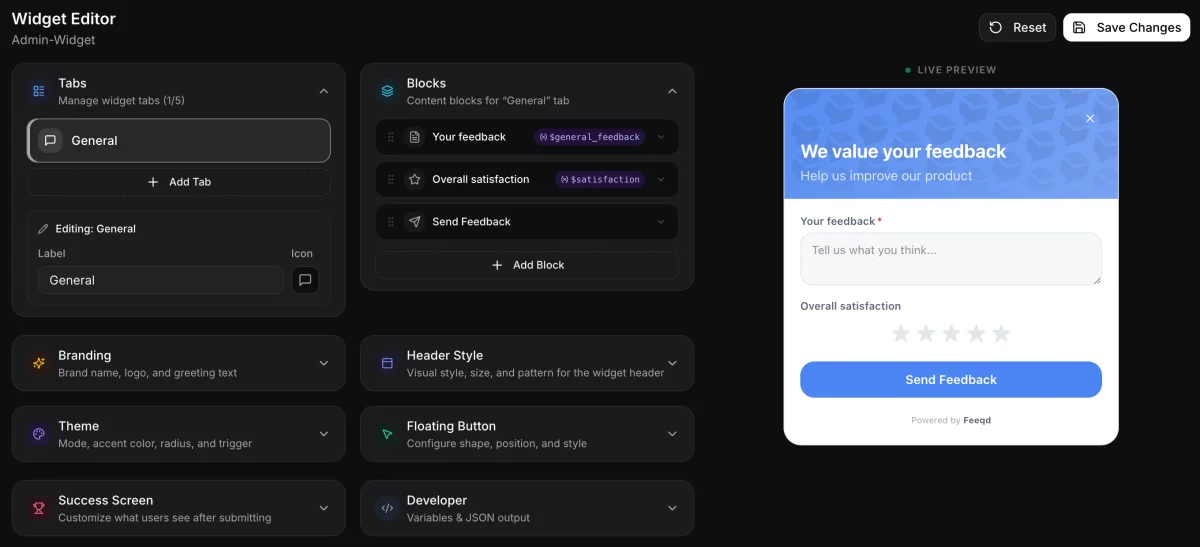
Before embedding anything, design the form your users will see. In Feeqd's widget editor, you drag and drop blocks to build your form: text inputs, rating scales, NPS, radio buttons, email fields, and more. You can create multiple tabs for different feedback types within a single widget.
Step 2: Customize the appearance
Match the widget to your brand. Most tools let you set colors, border radius, and positioning. Feeqd offers five header styles (gradient, banner, minimal, window, split), pattern overlays, and light/dark mode support. The goal is making the widget feel native to your product, not like a third-party add-on.
Step 3: Embed the script
Add the widget script to your site. With Feeqd, it's two lines of code:
<script src="https://cdn.feeqd.com/feeqd-widget.iife.js"></script>
<script>FeeqdWidget.init({ widgetId: 'your-widget-id' });</script>
The script loads asynchronously and won't block your page render. At 18KB, it adds negligible load time.
Step 4: Test in preview mode
Before going live, test the widget in preview mode. Submit test entries, check that conditional logic works correctly, and verify the form renders properly on mobile. Feeqd's preview mode disables actual submissions so you can test freely.
Step 5: Connect to your feedback workflow
The widget is just the collection point. Connect it to your feedback management workflow so submissions flow into organized boards where your team can categorize, vote on, and prioritize them. Without this connection, you're collecting feedback into a void.
Best Practices for Feedback Widgets
Keep forms short
Three to five fields maximum. Every additional field reduces completion rates. When I built Feeqd's widget editor, we tested forms with 3 fields versus 7 fields. The shorter forms consistently got more submissions. If you need detailed feedback, use conditional logic to show follow-up questions only when relevant, rather than front-loading every field.
Position the button where users expect it
Bottom-right corner is the convention for a reason: it's out of the way but findable. If your product has a persistent sidebar or bottom nav, place the button near those elements so it feels like part of the UI. We experimented with left-side and top-bar placements early on and found bottom-right consistently had the highest engagement.
Match your product's visual language
A feedback widget that looks like it belongs to a different product breaks trust. Match colors, fonts, border radius, and overall design language. Dark mode products need a dark mode widget. This is why Feeqd ships five header styles and full theme customization: a gradient header that looks great on a marketing site feels wrong inside a developer tool's dark UI.
Use different forms for different feedback types
Don't force bug reports and feature requests through the same form. Use tabs or separate widgets for different feedback types. A bug report needs steps to reproduce. A feature request needs a description of the desired outcome. Mixing them creates messy data. Feeqd's tab system was designed specifically for this: one widget, multiple forms, clean separation.
Close the feedback loop
Users who submit feedback and never hear back stop giving feedback. Connect your widget to a public roadmap or status updates so users can see their feedback moving through your pipeline: Pending, In Progress, Completed. This transparency turns one-time submitters into engaged contributors.
Measure what matters
Track three metrics to know if your widget is working: submission volume (are people using it?), completion rate (are they finishing the form?), and feedback quality (are submissions actionable or vague?). If volume is low, the button is too hidden. If completion drops off, your form is too long. If quality is poor, your fields need better prompts.
Common Mistakes to Avoid
Showing the widget on every page
Not every page needs a feedback button. Landing pages, checkout flows, and onboarding sequences should stay focused. Show the widget on product pages where users actively work with your features, not on marketing pages where it's a distraction. When I first tested Feeqd's widget, I had it on every page including the pricing page. The feedback I got was mostly "is there a free trial?" instead of actual product insights. Restricting it to dashboard pages immediately improved signal quality.
Asking too many questions
A 10-field feedback form is a survey pretending to be a widget. Users expect quick interactions from a floating button. If you need detailed input, start with a simple "What's on your mind?" field and follow up via email.
Ignoring mobile
Over half of web traffic is mobile. If your widget doesn't render properly on small screens (full-width modal, large tap targets, readable text), you're missing feedback from a huge portion of your users. Feeqd's widget renders full-width on screens under 640px with larger tap targets, because we learned early that tiny close buttons on mobile cause more frustration than the feedback is worth. Test on real devices, not just browser emulators.
Collecting feedback without a workflow
The widget is the easy part. Without a system to track feature requests, prioritize based on community voting, and connect to your product roadmap, feedback piles up and goes stale. This is why building a feedback system matters more than choosing the perfect widget.
Best Feedback Widget Tools
For a deeper comparison with performance benchmarks and decision framework, see our best feedback widgets for websites guide. If your scope is specifically in-app (web app, SaaS product, or mobile) rather than marketing site embeds, our in-app feedback tools breakdown covers the five frames (micro-surveys, visual, messaging, analytics, feature requests) with tools per frame, and our in-app feedback widget implementation guide maps 6 widget patterns to specific UX moments. Here's a quick overview for this post. Pricing verified April 2026; check vendor sites for current information.
| Tool | Widget Type | Free Plan | Customization | Size/Performance | Starting Price |
|---|---|---|---|---|---|
| Feeqd | Floating button + modal, tabs | No (Starter+) | Full theming, 5 header styles, 18 blocks | 18KB, async load | Free (boards) / $19/mo (widget) |
| Canny | Embedded + popup | Limited | Basic styling | Medium | $79/mo |
| Hotjar | Survey popup + heatmaps | Yes (limited) | Template-based | Heavier (analytics bundle) | Free / $32/mo |
| Featurebase | Floating button | Yes | Theme colors | Light | Free / $29/mo |
| Marker.io | Screenshot annotation | No | Brand colors | Light | $39/mo |
| Qualaroo | Nudge popups | No | Template-based | Medium | $19.99/mo |
Feeqd stands out for its block-based editor (18 block types with conditional logic), multi-tab architecture, and 18KB bundle size. The widget is on paid plans (Starter at $19/mo), but the free plan includes public feedback boards with voting and a roadmap. If you want a complete feedback loop from collection through prioritization to roadmap, it handles the full workflow.
Canny is the established player with deep integrations (Jira, Intercom, Salesforce). If your team needs bidirectional data sync with existing tools, Canny's integration ecosystem is hard to beat. The trade-off is pricing: Canny starts at $79/mo with no permanent free tier. Check canny.io for current pricing.
Hotjar is better categorized as a behavioral analytics tool that includes feedback surveys. If you need heatmaps, session recordings, and occasional feedback popups, Hotjar covers multiple needs in one tool. It's not built for ongoing feature request management.
Featurebase is a newer entrant combining feedback boards with a widget and changelog. The free tier is functional, and the UI is modern. Good option for teams that want Canny-like features at a lower price point.
For visual bug reporting specifically, Marker.io lets users annotate screenshots directly on your site. It integrates with Jira, Asana, and Trello, making it ideal for QA workflows rather than general user feedback.
FAQ
What are feedback widgets?
Feedback widgets are small UI components embedded in websites or applications that let users submit feedback without leaving the page. They typically appear as floating buttons that open a form, panel, or modal where users can report bugs, request features, or share general input.
What is a review widget?
A review widget collects star ratings or written reviews, typically for e-commerce products or services. It's different from a feedback widget: review widgets face external customers and focus on public ratings, while feedback widgets face product users and focus on internal product improvement.
How do I choose between a feedback widget and a survey tool?
Use a feedback widget when you want users to submit feedback on their own terms (reactive collection). Use a survey tool when you want to ask specific questions at specific moments (proactive collection). Many teams use both: a persistent feedback widget for ongoing input and targeted surveys for specific research questions. For a longer breakdown, see our feedback widget vs survey decision framework.
How much do feedback widgets cost?
Pricing varies widely. Some tools (Hotjar, Featurebase) offer limited free plans. Most paid widgets start between $19/mo and $79/mo. Feeqd's widget is included in the Starter plan at $19/mo, which also includes feedback boards, voting, and a roadmap. Enterprise tools like UserVoice charge $499/mo and up. Check vendor pricing pages for current rates, as they change frequently.
What are the 5 R's of feedback?
The 5 R's are a commonly referenced feedback framework: Request (ask for input), Receive (collect it), Reflect (analyze patterns), Respond (acknowledge to the user), and Resolve (act on it). Variations exist across different sources, but the core idea is the same. A feedback widget handles the first two R's (request and receive) by making collection frictionless. The remaining three require a feedback management workflow to organize, prioritize, and close the loop.
How do I get a Google review widget?
Google review widgets (for displaying star ratings from Google Business Profile) are a different category from product feedback widgets. Services like Elfsight, EmbedSocial, and Google's own Place API let you embed Google reviews on your site. If you're looking to collect product feedback rather than display customer reviews, a feedback widget like Feeqd or Hotjar is the right tool.
Get started with Feeqd for free
Let your users tell you exactly what to build next
Collect feedback, let users vote, and ship what actually matters. All in one simple tool that takes minutes to set up.
Sign up for free