
Most feedback forms get built one of two ways. Either dragged together in a generic survey tool (great for HR, awkward for product feedback), or hand-coded by an engineer who has better things to do than ship a form for the third time this quarter. The middle path is a no-code custom feedback form builder that ships in minutes, fits your brand, and gives product teams the field types they actually need: NPS, ratings, branching, multi-step.
This guide covers what a custom feedback form is, the field types worth using, how conditional logic transforms a static form into a smart one, and a 5-minute walkthrough you can copy.
I've built and maintained Feeqd's widget editor for two years. The trade-offs below are the ones I hit while shipping forms for our own users and watching dozens of teams build theirs.
What Is a Custom Feedback Form?
A custom feedback form is a structured input collected from users about a product, feature, or experience, with field types and logic chosen for the specific question being asked, not pulled from a generic survey template.
The "custom" matters. A bug report needs different fields than an NPS check. A feature request needs voting and category, not a 1-5 satisfaction scale. A churn-exit survey needs branching based on the reason picked. One generic form for all three is how you end up with low completion rates and unstructured text dumps that nobody reads.
Three properties distinguish a custom feedback form from a survey:
- Targeted to one feedback type. Bugs, features, satisfaction, or exit, not all four.
- Field types match the question. NPS for satisfaction, voting for prioritization, file upload for bugs.
- Triggered in context. Embedded where the user has the feedback, not emailed two weeks later.
This guide is the implementation companion to the feedback widget pillar, which covers widget design and embed patterns. For when a form makes more sense than a standalone survey, see feedback widget vs survey.
Field Types You Actually Need
A custom feedback form builder is only as useful as its field type catalog. Most product teams use a small subset. The 10 below cover roughly 95% of real cases:
| Field type | Best use | Avoid for |
|---|---|---|
| Short text | Email, name, single-line answers | Open-ended "anything else?" (use textarea) |
| Textarea | Bug descriptions, feature explanations | Yes/no questions |
| Rating (1-5 stars) | Satisfaction with a specific feature | Overall product loyalty (use NPS) |
| Thumbs up/down | Quick reactions, single-question microsurveys | Anything that needs nuance |
| NPS scale (0-10) | Overall product loyalty, executive reporting | Feature-level satisfaction (use rating) |
| Slider | Subjective scoring with finer granularity | Yes/no or categorical choices |
| Radio (single-select) | Mutually exclusive options (4-6 max) | Lists with 7+ options (use dropdown) |
| Checkbox (multi-select) | "Pick all that apply" categories | Required single answers |
| Dropdown | Long lists (countries, categories) | 4 or fewer options (use radio) |
| Capturing identity for follow-up | Anonymous-by-default forms |
Two patterns I see teams get wrong: using NPS for everything (NPS is a single business metric, not a satisfaction tool. See NPS vs CSAT for when each fits) and dropping textareas as the only field (you get unstructured noise and no way to segment).
Conditional Logic: When Forms Get Smart
A static form asks every question to every user. A form with conditional logic asks the right question to the right user at the right moment. This is the difference between a 30% completion rate and a 70% one.
The three patterns that earn their keep:
Branch by category. First question: "What's this feedback about?" Bug → show severity + reproduction steps + screenshot upload. Feature → show description + impact area + voting. Praise → show short text + email opt-in. Same form, three different paths, no wasted fields.
Branch by score. NPS pattern: detractors (0-6) get "What went wrong?", passives (7-8) get "What would make this a 9 or 10?", promoters (9-10) get "What did you love?". The promoter answer feeds testimonials, the detractor answer feeds the roadmap. Without branching, you ask everyone the same generic "any comments?" and get nothing useful.
Skip irrelevant blocks. If the user answers "no" to "did you try the new export feature?", skip the 4 follow-up questions about export. Conditional skip cuts time-to-complete in half on multi-feature surveys.
The mistake teams make is over-branching. If your form has more conditional rules than questions, you're rebuilding a decision tree, not collecting feedback. Cap at 3-4 conditions per form.
Multi-Step Forms: Tabs and Page Breaks
A form with 12 fields on one page hits roughly 20-30% completion. The same 12 fields split across 3 steps with progress indication hits 50-60%. The split works because each step asks for less commitment, and once a user clicks "Next", they're invested.
Two ways to split:
Tabs. Top-of-form tabs let the user pick the type of feedback first. Three tabs labeled "Bug", "Feature", "Praise" mean the user opts into the right form before answering anything. This works well for always-visible widgets where the user arrives with intent.
Page breaks. A linear multi-step form with "Next" and "Back" buttons. Best for long-but-required flows like onboarding feedback or churn-exit surveys.
Combining both is rare and usually overkill. Pick one pattern per form.
Where to Embed the Form
A custom feedback form lives in one of four places. Each fits a different moment.
- Floating button (always-visible). Bottom-right corner, opens a modal on click. Best as the default for product feedback. Continuous, low-friction, in-context. Covered in detail in website feedback button and feedback widget.
- Inline on a page. Embedded directly into the page (after a blog post, on a settings page, on a "help us improve" page). Best for soliciting feedback at a specific moment without interrupting the rest of the experience.
- Triggered modal. Opens after a specific event (after first export, after 30 days of use, after a feature is used 5 times). Best for moment-specific NPS or post-action surveys.
- Standalone page. A dedicated URL with the form as the only content. Best for emailed surveys, exit feedback, and shareable links.
The same custom feedback form can live in all four places if your builder supports multiple embed targets. Most don't.
A 5-Minute Walkthrough
Here's the rough flow for building a custom feedback form in a no-code builder, using Feeqd as the concrete example. Most builders work similarly.
1. Create or pick a board. A board is the destination for the feedback. One board per type makes triage easier (Bugs board, Feature requests board, NPS board). Don't dump everything into one.
2. Open the editor. The editor is where you drag and drop blocks. You'll see a live preview alongside it.
3. Add blocks. Drop in the field types you need. Start minimal: 3 fields beats 7 every time. The order matters: easy questions first, friction-heavy questions (email, file upload) last.
4. Configure conditional logic. For each block that should branch, set the rule: "Show this block if [previous block] equals [value]". Test it in the live preview before publishing.
5. Style and embed. Pick brand colors (or inherit from the page). Copy the embed snippet. Paste it before </body>. Done.
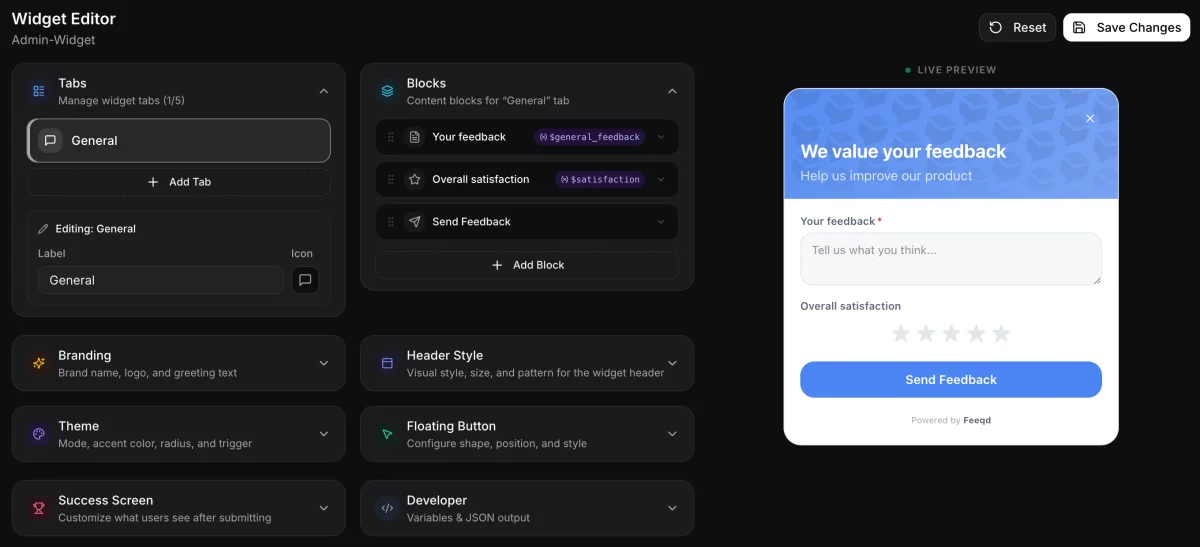
The first time takes 10 minutes because you're learning. The second form takes 3.
What to Avoid
Five anti-patterns I keep seeing in product feedback forms.
- More than 5-7 fields on a single step. Every additional field roughly cuts completion rate in half (Nielsen Norman Group's form research and Baymard Institute's form usability data both back this up). If you really need 12 fields, split them.
- Requiring email upfront. Anonymous-by-default beats sign-in-required for response volume by roughly 2x. Make email optional and put it last.
- Asking for everything in one form. A bug report and an NPS score don't belong together. Tabs or separate forms.
- Generic "any other comments?" as the only open field. You'll get noise. Replace with targeted prompts: "What feature would you build first?", "What blocked you from completing the task?".
- Over-customizing the styling. Match your brand, then stop. Forms that look like art projects feel less trustworthy than forms that look like the rest of the product.
FAQ
Can I build a custom feedback form without code?
Yes. Modern feedback platforms (including Feeqd) ship a no-code builder where you drag field types into the form, configure conditional logic, and embed with a snippet. No HTML, CSS, or JavaScript required for the form itself, though styling can be customized further with CSS overrides if you need full brand control.
What's the best free feedback form builder for product teams?
For product feedback specifically, look for builders that include voting boards and roadmap integration, not just form fields. Generic survey tools (Google Forms, Typeform free tier) work for one-off NPS surveys but lack the structured-feedback workflow product teams need. See free feedback tools for startups for a stage-by-stage breakdown.
How many fields should a feedback form have?
3 to 5 for in-product widgets, up to 10 for standalone surveys with progress indication. Each additional field roughly halves completion rate after the fifth, so the marginal value of question 6 is rarely worth the response loss.
Can I add an NPS question to a custom form?
Yes. NPS is just a 0-10 scale plus an open follow-up keyed to the score. A capable form builder includes NPS as a native block type and supports branching on the score (detractors vs promoters). If your builder only offers a 1-5 rating, you can simulate NPS with a slider or radio block, but native NPS is cleaner.
How do I prevent spam on a public feedback form?
Three layers: invisible CAPTCHA (Cloudflare Turnstile or Google reCAPTCHA), rate limiting per IP, and honeypot fields. Most no-code builders include the first two by default. If your form is collecting feedback at scale, also consider requiring email verification for high-stakes channels (bug reports, feature requests) while keeping anonymous submission open for praise/general feedback.
Wrapping Up
A custom feedback form isn't a survey, and a survey tool won't build the right form for product feedback. The fields, the logic, and the embed targets are different. Start with three fields, add conditional logic only when a single linear form stops fitting, and split into multiple steps before letting any one form pass seven fields. The widget editor that gives you all 10 field types and the three conditional logic patterns from this post is the same one running on Feeqd's own feedback boards, so the trade-offs above translate directly into the same drag-and-drop interface.
Get started with Feeqd for free
Let your users tell you exactly what to build next
Collect feedback, let users vote, and ship what actually matters. All in one simple tool that takes minutes to set up.
Sign up for free