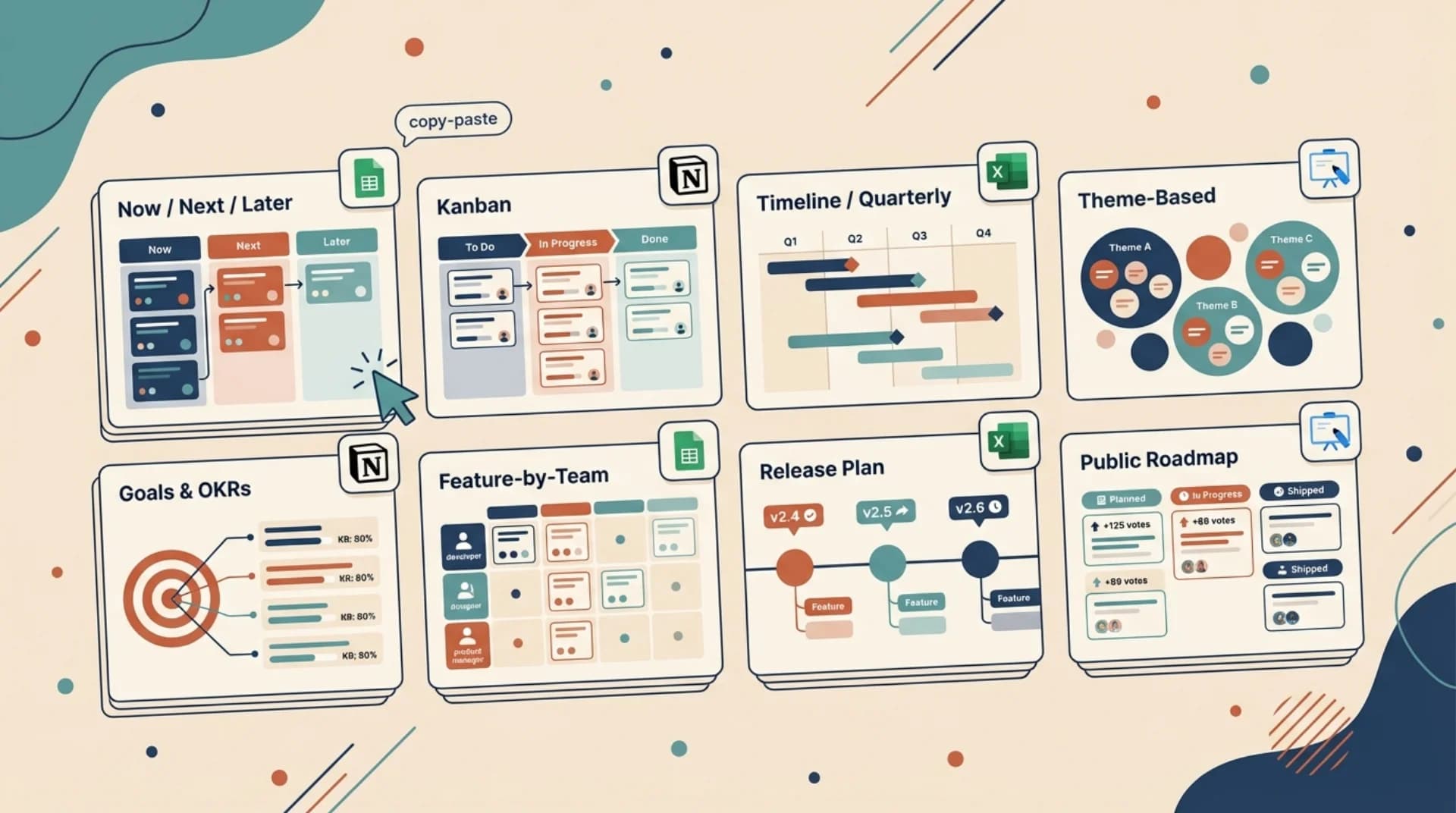
You want a sample product roadmap template. Not an essay about what a roadmap is. So here are 8 templates you can copy straight into Google Sheets, Excel, Notion, or Miro. Each one is laid out as a table you can paste into any tool in under a minute.
The templates below come from two years of running product roadmaps at Feeqd and from studying how hundreds of other product teams structure theirs. Each template has a clear use case (which stage, which audience, which team size), the raw structure, and notes on when to pick it over the others. The framing borrows from Atlassian's product roadmap playbook and from the format breakdown maintained by ProductPlan, both useful neutral references if you want the methodology behind the picks.
After the templates there's a format matrix (Sheets vs Excel vs Notion vs Miro vs a live roadmap tool) and a short section on why most teams eventually outgrow static templates. If you're only here to copy, download, or duplicate a template into your tool of choice, scroll to the one that matches your situation and grab it.
Quick Template Selector
Pick the template that matches your team's stage, audience, and preferred format:
| Your situation | Use this template | Why |
|---|---|---|
| Early-stage startup, internal only | Template 1 (Now / Next / Later) | Lowest overhead, no dates to miss |
| Engineering-led team with sprints | Template 2 (Kanban) | Mirrors how engineers already think |
| Executive or investor audience | Template 3 (Timeline / Quarterly) | Dates answer the question they'll ask |
| Strategy-driven product team | Template 4 (Theme-Based) | Groups work around user outcomes |
| OKR-driven company | Template 5 (Goals & OKRs) | Links features to measurable goals |
| Multi-team org (platform + product) | Template 6 (Feature-by-Team) | Shows dependencies across teams |
| Post-launch feature cadence | Template 7 (Release Plan) | Date-certain for marketing + support |
| Public-facing / customer audience | Template 8 (Public Roadmap) | Sets expectations without dates |
If none of these match exactly, pick the closest and edit. Roadmap templates are a starting skeleton, not a prescription.
Template 1: Now / Next / Later
The simplest sample product roadmap template that works. Three columns, no dates, one sentence per item. Used by early-stage teams, teams with heavy uncertainty, and anyone who's been burned by missed deadlines on a Gantt chart.
| Now | Next | Later |
|---|---|---|
| Onboarding flow rewrite | Slack integration | Mobile app (iOS) |
| Billing page redesign | SSO for teams plan | AI-assisted reporting |
| Export to CSV | Role-based permissions | Public API (v1) |
| Bug: search crashes on empty query | Notification center | Marketplace for plugins |
When to use it: early-stage product (pre-Series A), small teams (under 10), audiences that don't need committed dates.
When to skip it: board-level or executive reviews, public-facing roadmaps where users expect some sense of timing.
This is the framework used by the Product Development group at several well-known startups. For a deeper breakdown of why dateless roadmaps outperform dated ones in uncertain environments, see the Now / Next / Later roadmap guide.
Template 2: Kanban Roadmap
Three-lane Kanban, borrowed from engineering and applied to the product layer. The unit is a feature or initiative, not a ticket.
| To Do | In Progress | Shipped |
|---|---|---|
| Export to CSV | Onboarding flow rewrite | Dark mode |
| Role-based permissions | Billing page redesign | Custom fields on feedback |
| Slack integration | Bug: empty-state crash | Anonymous feedback option |
| Notification center | Widget performance upgrade |
When to use it: engineering-led product teams, teams already working in Jira or Linear, teams that want continuity between roadmap and delivery. Pairs well with sprint cadence.
Variant: add a fourth column for "Discovery" or "Validated" if you run dual-track agile.
Template 3: Timeline / Quarterly Roadmap
The format executives and investors expect. Items are placed in quarters with a soft commitment. Works as a Gantt in Excel, a timeline in Miro, or a quarterly board in Notion.
| Initiative | Q2 2026 | Q3 2026 | Q4 2026 | Q1 2027 |
|---|---|---|---|---|
| Onboarding rewrite | ████ | |||
| Billing redesign | ██ | |||
| Slack integration | ████ | |||
| Role-based permissions | ███ | █ | ||
| Mobile app (iOS) | ██████ | ██ | ||
| Public API v1 | ████ | |||
| AI-assisted reporting | ██████ |
When to use it: board meetings, investor updates, enterprise customers asking for commitments, teams with high delivery predictability.
When to avoid it: early-stage products where the next three items might shuffle tomorrow. Quarterly roadmaps broadcast commitments. Broken commitments erode trust faster than missing dates ever earns it.
Template 4: Theme-Based Roadmap
Organizes work around user outcomes instead of features. Each theme answers a user problem. Features sit underneath as proof.
| Theme | Outcome | Features |
|---|---|---|
| Reduce time-to-first-value | New users reach an "aha" moment in under 5 minutes | Onboarding rewrite, sample data, welcome email sequence |
| Make teams trust the data | Zero silent data loss, zero confusing states | Audit log, error boundaries, export to CSV |
| Help admins manage growth | Admins add 10+ users without support tickets | Role-based permissions, bulk invite, SSO |
| Unblock power users | Customers don't hit limits on the Pro plan | Higher API limits, saved views, advanced filters |
When to use it: product-led teams, teams with strong UX research discipline, roadmaps shared cross-functionally with marketing and sales.
The strength of this template is that it forces every feature to defend its spot against an outcome. If a feature doesn't fit any theme, it's probably not ready for the roadmap.
Template 5: Goals and OKRs Roadmap
Links each roadmap item to a measurable goal. Heavier to maintain, but the only format that survives an OKR-driven culture.
Sample numbers below are illustrative. Replace with your team's actual metrics before sharing.
| Objective | Key Result | Initiative | Expected Impact |
|---|---|---|---|
| Improve activation | Raise Day-7 activation from 32% to 48% | Onboarding rewrite + sample data | +10 pts |
| Improve activation | Raise Day-7 activation from 32% to 48% | Progressive profiling | +4 pts |
| Reduce churn | Reduce monthly churn from 4.1% to 2.8% | Role-based permissions | -0.5 pts |
| Reduce churn | Reduce monthly churn from 4.1% to 2.8% | Usage-based alerts | -0.4 pts |
| Grow expansion | Raise net revenue retention from 104% to 115% | Public API v1 | +5 pts |
| Grow expansion | Raise net revenue retention from 104% to 115% | Slack integration | +3 pts |
When to use it: companies running OKRs seriously, product teams asked to defend roadmap picks with numbers, teams post-PMF where growth levers are known.
Template 6: Feature-by-Team Roadmap
For organizations with multiple product teams, a platform team, and real dependencies. Shows who owns what and when two teams need to coordinate.
| Initiative | Product Team | Platform Team | Design | Target |
|---|---|---|---|---|
| Onboarding rewrite | Owner | Support (analytics events) | Owner | Q2 |
| Public API v1 | Consumer | Owner | N/A | Q4 |
| Mobile app | Owner | Support (auth refactor) | Owner | Q3 |
| SSO for teams plan | Consumer | Owner | Support | Q2 |
| Notification center | Owner | Support (event bus) | Owner | Q3 |
When to use it: 20+ product and engineering, multiple squads, visible coordination surface between product and platform.
Template 7: Release Plan / Milestones
Date-certain roadmap focused on shipping and announcing. Different from Template 3 because the unit is a release, not a quarter.
| Version | Target Date | Headline Feature | Supporting Features | Audience |
|---|---|---|---|---|
| 2.4 | May 2, 2026 | Role-based permissions | Audit log, bulk invite | Existing paid |
| 2.5 | Jun 12, 2026 | Slack integration | Webhook retries | All |
| 2.6 | Jul 25, 2026 | Public API v1 | Rate limits, docs | Developers |
| 3.0 | Sep 2026 | Mobile app (iOS) | Push notifications | New + existing |
When to use it: post-launch products with a marketing function, teams that run changelogs, B2B products where customers ask "when is X shipping." Pairs with a release notes template for the announcement side.
Template 8: Public Customer-Facing Roadmap
The template you'd show a customer. No internal politics, no dates you might miss. Three statuses plus vote counts if you're collecting input.
| Status | Item | Description | Votes |
|---|---|---|---|
| Under review | Zapier integration | Connect feeqd with 5,000 apps | 132 |
| Under review | Export feedback to Airtable | Two-way sync of board entries | 81 |
| Planned | Role-based permissions | Viewer, editor, admin roles | 204 |
| Planned | Slack integration | Notifications for new feedback and votes | 167 |
| In progress | Onboarding rewrite | Guided first-use flow | 98 |
| Shipped | Dark mode | System-preference dark theme | 413 |
| Shipped | Custom fields on feedback | Add tags, severity, segments | 221 |
When to use it: every SaaS product. A public product roadmap is the single most visible signal that a company listens. It sets expectations, deflects repeat questions, and gives customers a reason to stay engaged.
How to implement: you can run this as a Notion page or a Sheets tab, but once vote counts and submissions start mattering, static templates break. That's where the "live" option below comes in.
Which Format Should You Use?
Each template above works in any format. Here's how to pick the right container for your situation:
| Format | Best for | Strengths | Weaknesses |
|---|---|---|---|
| Google Sheets | Small team, internal only, needs collaboration | Free, multi-user, fast to create | Ugly to present, no status tracking |
| Excel | Executive review, no collaboration needed | Universal, powerful formulas, Gantt add-ins | Single-user by default, outdated feel |
| Notion | Product teams already using Notion | Relational database, prettier output, embeddable | Slow on mobile, expensive at scale |
| Miro / FigJam | Workshops, theme brainstorming, timeline reviews | Visual, whiteboard-native, good for async review | Weak for structured data, hard to maintain |
| PowerPoint / Google Slides | Board decks, investor updates | Easy to screenshot into reports | Every update requires re-editing slides |
| Live roadmap tool | Public-facing, multi-team, votes involved | Automatic sync, voting built-in, public URL | Not free beyond a point, platform lock-in |
The mechanism across every template on this page is the same: highlight the markdown table above, paste into your tool, and edit. No download wall, no email gate, no account required. If you want a free Excel or Sheets starting point outside this page, Smartsheet and Microsoft both maintain template galleries that pair well with the structures here.
Copy-paste a template into the format that matches your audience. If you're presenting to executives, Template 3 in Excel. If you're collecting customer feedback, Template 8 in a tool that supports voting. If you're workshopping themes with designers, Template 4 in Miro.
From Template to Live Roadmap
Every template above is a snapshot. The shortest possible summary of what I've seen in two years of product work: static templates work for the first three months. After that, they drift.
The patterns that break static templates, in the order they usually show up:
- The roadmap is out of date. Someone updates it after every meeting for two weeks, then stops. Readers learn not to trust it.
- Different audiences need different views. The board wants timeline. Customers want status. Engineering wants priority. A single sheet can't be all three.
- Customer votes or feedback start driving priority. Tallying votes by hand in a spreadsheet is a job nobody volunteers for.
- Public visibility becomes a growth lever. Once you want prospects and users to see the roadmap live, "copy of Q3-roadmap-v4-FINAL.xlsx" is the wrong artifact.
At this point teams move to a live roadmap tool. The options range from general (Notion, Linear) to purpose-built (feeqd, Canny, Productboard, Aha!). The advantage isn't prettier output. It's that a live roadmap connects to feedback, votes, and releases, so the board writes itself.
If you want to see what a live public roadmap looks like without committing anything, try feeqd free. The templates here still apply as the starting structure; you just stop maintaining the spreadsheet.
Common Mistakes With Roadmap Templates
Templates are scaffolding. Most teams using them fail in one of these ways:
- Copying the template and treating it as a plan. The template is a format. The plan is the argument for why these items, in this order, for this audience. Skip the argument and the roadmap becomes a wish list.
- Picking the format for the maker instead of the audience. A timeline Excel sheet is right for a board deck, wrong for a customer-facing page. The audience decides the format.
- Treating status columns as aspirational. Only "In Progress" should mean "someone is actively working." When teams mark everything "In Progress," the status loses meaning.
- Letting dates calcify. Quarterly dates on early-stage work are fiction. Either remove dates (Templates 1, 2, 4, 8) or hold the team accountable to them (Templates 3, 7).
- Forgetting the outcome. Features without a theme or a goal (Templates 4 and 5) drift into "because someone asked." Every item needs a short answer to "why this."
- Never closing the loop. For Template 8 especially, customers who voted want to know what happened. Closing the feedback loop is the step that makes the public roadmap a growth asset instead of a graveyard.
For a broader discussion of roadmap formats with real examples from public products, see product roadmap examples. For the full pillar on roadmap tools and selection criteria, the product roadmap software guide is the canonical reference.
Frequently Asked Questions
How to create a simple product roadmap?
Pick the Now / Next / Later template (Template 1 above), fill three columns with one-sentence items, and commit to reviewing it every two weeks. That's the minimum viable roadmap. Keep items short (under 10 words), limit Now to 3-5 items, and move items across columns as reality changes. If you need dates, upgrade to Template 3 once the team ships consistently. The full how-to walkthrough covers the argument layer (why these items, in this order) which the template alone doesn't handle.
Can ChatGPT create a roadmap?
ChatGPT and other LLMs can draft the structure of a roadmap from your notes, but they can't create the actual roadmap because they don't know your customers, priorities, or constraints. Use them for three things: brainstorming theme names for Template 4, rewriting vague initiatives into clear one-liners, and generating placeholder content while you fill in real data. Treat the output as a first draft, not the plan. The prioritization decisions are still yours.
How to make a product roadmap in Excel?
Copy any of the templates above directly into an Excel sheet. For Template 3 (timeline), add one column per quarter and use Excel's conditional formatting to color cells. For a Gantt look, merge cells across the quarters each item spans and fill them with a color. If you want something fancier, Microsoft's built-in "Project Timeline" and "Gantt Chart" templates are a starting point, but a 3-column Now / Next / Later sheet is faster to maintain and fits most teams better. For a startup-specific version see the startup roadmap guide.
What is included in a product roadmap?
A useful product roadmap includes: (1) initiatives or features, (2) a structure that communicates priority or timing (columns, lanes, or dates), (3) an owner or team for each item, (4) a link between each item and a customer outcome or business goal, and (5) a status or phase. Less useful roadmaps include exhaustive task breakdowns, engineering estimates, or internal-only priorities. The audience determines which of the above matter. A board deck needs timing; a customer-facing roadmap needs status; an engineering roadmap needs owners.
Ship Faster Than You Maintain the Template
The best sample product roadmap template is the one your team actually keeps current. Pick the simplest format that matches your audience, copy it into whatever tool you already live in, and agree on a review cadence before you hit save.
If the template maintenance becomes a chore, that's the signal to move to a live tool. The templates above still work as the structure; you just stop retyping them. Try feeqd free if you want a live public roadmap with voting, feedback integration, and public URL in one place. No credit card, no setup call.
Get started with Feeqd for free
Let your users tell you exactly what to build next
Collect feedback, let users vote, and ship what actually matters. All in one simple tool that takes minutes to set up.
Sign up for free